Créer une extension Chrome avec IA : Résumé de page web
Les extensions Chrome permettent d’ajouter des fonctionnalités personnalisées au navigateur. Avec l’IA, on peut créer des extensions surpuissantes :
- 📝 Résumer des articles en 1 clic
- 🌐 Traduire instantanément
- ✍️ Améliorer le texte sélectionné
- 💡 Extraire insights d’une page
- 🤖 Assistant de recherche contextuel
Dans ce tutoriel, nous allons créer “QuickSummarize” : une extension qui résume n’importe quelle page web avec un LLM.
Fonctionnalités :
- ✅ Bouton dans toolbar Chrome
- ✅ Clic → Extraction contenu page
- ✅ Appel API (GPT-4o-mini, Claude, local)
- ✅ Affichage résumé dans popup
- ✅ Historique des résumés (storage local)
- ✅ Copie en un clic
- ✅ Support multilingue
Stack technique :
- Manifest V3 (standard 2025)
- JavaScript (vanilla, pas de framework)
- Content Scripts (injection dans pages)
- Service Worker (background logic)
- Chrome Storage API (persistance)
- OpenAI API (ou alternatives)
Temps estimé : 2-3 heures Coût : ~$0.01-0.05 par résumé (OpenAI) Niveau : Intermédiaire (JavaScript requis)
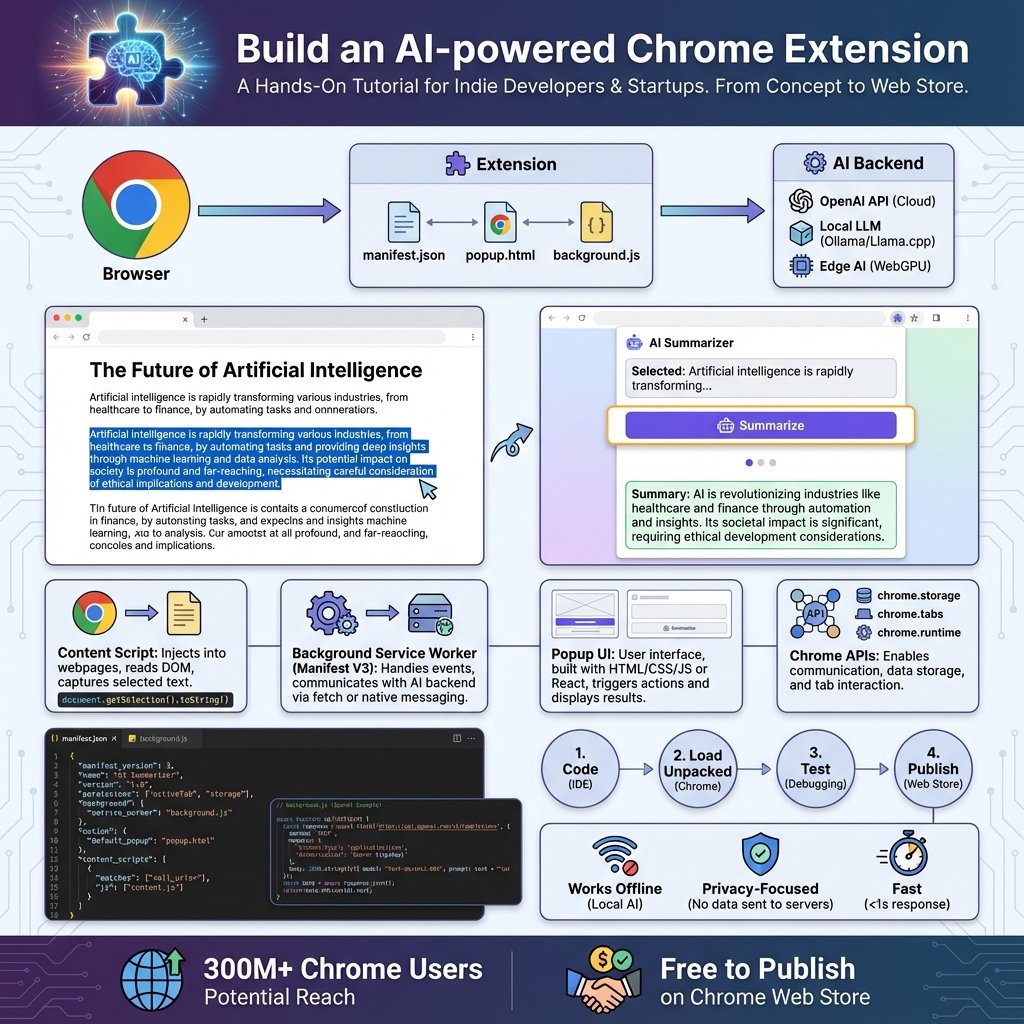
Architecture de l’extension
Vue d’ensemble
┌────────────────────────────────────────────────────┐
│          CHROME EXTENSION : QuickSummarize         │
├────────────────────────────────────────────────────┤
│                                                    │
│  1. INTERFACE UTILISATEUR                         │
│  ┌──────────────┐         ┌─────────────┐        │
│  │   Toolbar    │  Click  │   Popup     │        │
│  │   Icon  🔵   │ ──────> │   popup.html│        │
│  └──────────────┘         └──────┬──────┘        │
│                                   │                │
│  2. CONTENT SCRIPT (injection)                    │
│  ┌─────────────────────────────────────┐          │
│  │  content.js                         │          │
│  │  - Injecté dans page web            │          │
│  │  - Extrait contenu (article, body)  │          │
│  │  - Communique avec background       │          │
│  └────────────┬────────────────────────┘          │
│               │ (message)                          │
│               v                                    │
│  3. SERVICE WORKER (background)                   │
│  ┌─────────────────────────────────────┐          │
│  │  background.js                      │          │
│  │  - Reçoit contenu extrait           │          │
│  │  - Appelle API LLM                  │          │
│  │  - Retourne résumé                  │          │
│  │  - Gère storage                     │          │
│  └────────────┬────────────────────────┘          │
│               │                                    │
│               v                                    │
│  4. API LLM (externe)                             │
│  ┌─────────────────────────────────────┐          │
│  │  OpenAI / Anthropic / Local         │          │
│  │  POST /chat/completions             │          │
│  │  { "messages": [...] }              │          │
│  └─────────────────────────────────────┘          │
│                                                    │
│  5. STORAGE (persistance)                         │
│  ┌─────────────────────────────────────┐          │
│  │  chrome.storage.local                │          │
│  │  - API key                           │          │
│  │  - Historique résumés                │          │
│  │  - Préférences utilisateur           │          │
│  └─────────────────────────────────────┘          │
│                                                    │
└────────────────────────────────────────────────────┘
Fichiers de l’extension
quick-summarize/
├── manifest.json          # Configuration extension
├── icons/
│   ├── icon16.png         # 16x16 (toolbar)
│   ├── icon48.png         # 48x48 (extensions page)
│   └── icon128.png        # 128x128 (Web Store)
├── popup/
│   ├── popup.html         # Interface popup
│   ├── popup.css          # Styles
│   └── popup.js           # Logique UI
├── content/
│   └── content.js         # Script injecté dans pages
├── background/
│   └── background.js      # Service worker
├── options/
│   ├── options.html       # Page settings
│   └── options.js         # Config API key
└── README.md
Setup et manifest
Créer la structure
mkdir quick-summarize
cd quick-summarize

# Créer dossiers
mkdir -p icons popup content background options

# Fichiers principaux
touch manifest.json
touch popup/popup.html popup/popup.css popup/popup.js
touch content/content.js
touch background/background.js
touch options/options.html options/options.js
Manifest V3 (manifest.json)
{
  "manifest_version": 3,
  "name": "QuickSummarize - AI Web Page Summarizer",
  "version": "1.0.0",
  "description": "Summarize any web page with AI in one click",

  "icons": {
    "16": "icons/icon16.png",
    "48": "icons/icon48.png",
    "128": "icons/icon128.png"
  },

  "action": {
    "default_popup": "popup/popup.html",
    "default_icon": {
      "16": "icons/icon16.png",
      "48": "icons/icon48.png"
    },
    "default_title": "Summarize this page"
  },

  "permissions": [
    "storage",
    "activeTab",
    "scripting"
  ],

  "host_permissions": [
    "https://api.openai.com/*",
    "https://api.anthropic.com/*"
  ],

  "background": {
    "service_worker": "background/background.js"
  },

  "content_scripts": [
    {
      "matches": ["<all_urls>"],
      "js": ["content/content.js"],
      "run_at": "document_idle"
    }
  ],

  "options_page": "options/options.html"
}
Explications :
manifest_version: 3: Standard actuel (V2 deprecated 2025)permissions:storage(local),activeTab(accès page courante),scripting(injection)host_permissions: Autoriser calls API externesservice_worker: Remplace background pages (V2)content_scripts: Auto-injecté dans toutes pages
Icônes
Créez 3 icônes ou utilisez un générateur (ex: favicon.io) :
icon16.png: 16×16px (toolbar)icon48.png: 48×48px (page extensions)icon128.png: 128×128px (Chrome Web Store)
Ou placeholder simple :
# Créer icônes simples (requiert ImageMagick)
convert -size 16x16 xc:blue icons/icon16.png
convert -size 48x48 xc:blue icons/icon48.png
convert -size 128x128 xc:blue icons/icon128.png
Interface popup
HTML (popup/popup.html)
<!DOCTYPE html>
<html lang="fr">
<head>
  <meta charset="UTF-8">
  <meta name="viewport" content="width=device-width, initial-scale=1.0">
  <title>QuickSummarize</title>
  <link rel="stylesheet" href="popup.css">
</head>
<body>
  <div class="container">
    <!-- Header -->
    <header>
      <h1>🤖 QuickSummarize</h1>
      <button id="settings-btn" title="Settings">⚙️</button>
    </header>

    <!-- Status -->
    <div id="status" class="status hidden"></div>

    <!-- Actions -->
    <div class="actions">
      <button id="summarize-btn" class="btn-primary">
        📝 Summarize This Page
      </button>
    </div>

    <!-- Summary Display -->
    <div id="summary-container" class="summary-container hidden">
      <h3>Summary:</h3>
      <div id="summary-content" class="summary-content"></div>
      <div class="summary-actions">
        <button id="copy-btn" class="btn-secondary">📋 Copy</button>
        <button id="clear-btn" class="btn-secondary">🗑️ Clear</button>
      </div>
    </div>

    <!-- History -->
    <div id="history-container" class="history-container hidden">
      <h3>Recent Summaries:</h3>
      <ul id="history-list"></ul>
    </div>

    <!-- Loading -->
    <div id="loading" class="loading hidden">
      <div class="spinner"></div>
      <p>Summarizing...</p>
    </div>
  </div>

  <script src="popup.js"></script>
</body>
</html>
CSS (popup/popup.css)
/* popup.css - Styles pour popup extension */

* {
  margin: 0;
  padding: 0;
  box-sizing: border-box;
}

body {
  width: 400px;
  min-height: 300px;
  font-family: -apple-system, BlinkMacSystemFont, 'Segoe UI', Roboto, sans-serif;
  background: linear-gradient(135deg, #667eea 0%, #764ba2 100%);
  color: #333;
}

.container {
  background: white;
  padding: 20px;
  border-radius: 12px;
  margin: 10px;
  box-shadow: 0 4px 20px rgba(0,0,0,0.1);
}

/* Header */
header {
  display: flex;
  justify-content: space-between;
  align-items: center;
  margin-bottom: 20px;
  padding-bottom: 15px;
  border-bottom: 2px solid #f0f0f0;
}

h1 {
  font-size: 1.5rem;
  color: #667eea;
}

#settings-btn {
  background: none;
  border: none;
  font-size: 1.2rem;
  cursor: pointer;
  padding: 5px;
  opacity: 0.6;
  transition: opacity 0.2s;
}

#settings-btn:hover {
  opacity: 1;
}

/* Status */
.status {
  padding: 10px;
  border-radius: 6px;
  margin-bottom: 15px;
  font-size: 0.9rem;
}

.status.success {
  background: #d4edda;
  color: #155724;
}

.status.error {
  background: #f8d7da;
  color: #721c24;
}

/* Actions */
.actions {
  margin-bottom: 20px;
}

.btn-primary {
  width: 100%;
  padding: 12px;
  background: linear-gradient(135deg, #667eea 0%, #764ba2 100%);
  color: white;
  border: none;
  border-radius: 8px;
  font-size: 1rem;
  font-weight: 600;
  cursor: pointer;
  transition: transform 0.2s, box-shadow 0.2s;
}

.btn-primary:hover {
  transform: translateY(-2px);
  box-shadow: 0 4px 12px rgba(102, 126, 234, 0.4);
}

.btn-primary:active {
  transform: translateY(0);
}

.btn-primary:disabled {
  opacity: 0.5;
  cursor: not-allowed;
  transform: none;
}

/* Summary */
.summary-container {
  margin-top: 20px;
  padding-top: 20px;
  border-top: 2px solid #f0f0f0;
}

.summary-container h3 {
  font-size: 1.1rem;
  margin-bottom: 10px;
  color: #667eea;
}

.summary-content {
  background: #f8f9fa;
  padding: 15px;
  border-radius: 8px;
  line-height: 1.6;
  max-height: 300px;
  overflow-y: auto;
  margin-bottom: 15px;
  font-size: 0.95rem;
}

.summary-content::-webkit-scrollbar {
  width: 6px;
}

.summary-content::-webkit-scrollbar-thumb {
  background: #667eea;
  border-radius: 3px;
}

.summary-actions {
  display: flex;
  gap: 10px;
}

.btn-secondary {
  flex: 1;
  padding: 8px;
  background: #f0f0f0;
  border: none;
  border-radius: 6px;
  font-size: 0.9rem;
  cursor: pointer;
  transition: background 0.2s;
}

.btn-secondary:hover {
  background: #e0e0e0;
}

/* Loading */
.loading {
  text-align: center;
  padding: 30px;
}

.spinner {
  width: 40px;
  height: 40px;
  margin: 0 auto 15px;
  border: 4px solid #f0f0f0;
  border-top: 4px solid #667eea;
  border-radius: 50%;
  animation: spin 1s linear infinite;
}

@keyframes spin {
  to { transform: rotate(360deg); }
}

/* History */
.history-container {
  margin-top: 20px;
  padding-top: 20px;
  border-top: 2px solid #f0f0f0;
}

.history-container h3 {
  font-size: 1.1rem;
  margin-bottom: 10px;
  color: #667eea;
}

#history-list {
  list-style: none;
}

#history-list li {
  padding: 10px;
  background: #f8f9fa;
  border-radius: 6px;
  margin-bottom: 8px;
  font-size: 0.85rem;
  cursor: pointer;
  transition: background 0.2s;
}

#history-list li:hover {
  background: #e9ecef;
}

/* Utility */
.hidden {
  display: none !important;
}
JavaScript (popup/popup.js)
/**
 * popup.js - Logique de l'interface popup
 */

// Elements
const summarizeBtn = document.getElementById('summarize-btn');
const summaryContainer = document.getElementById('summary-container');
const summaryContent = document.getElementById('summary-content');
const loadingDiv = document.getElementById('loading');
const statusDiv = document.getElementById('status');
const copyBtn = document.getElementById('copy-btn');
const clearBtn = document.getElementById('clear-btn');
const settingsBtn = document.getElementById('settings-btn');

// État
let currentSummary = '';

/**
 * Afficher message de status
 */
function showStatus(message, type = 'success') {
  statusDiv.textContent = message;
  statusDiv.className = `status ${type}`;
  statusDiv.classList.remove('hidden');

  setTimeout(() => {
    statusDiv.classList.add('hidden');
  }, 3000);
}

/**
 * Bouton Summarize
 */
summarizeBtn.addEventListener('click', async () => {
  try {
    // Vérifier API key configurée
    const { apiKey } = await chrome.storage.local.get(['apiKey']);
    if (!apiKey) {
      showStatus('⚠️ Please configure API key in settings', 'error');
      return;
    }

    // Désactiver bouton, afficher loading
    summarizeBtn.disabled = true;
    loadingDiv.classList.remove('hidden');
    summaryContainer.classList.add('hidden');

    // Obtenir tab active
    const [tab] = await chrome.tabs.query({ active: true, currentWindow: true });

    // Envoyer message au content script pour extraire contenu
    const response = await chrome.tabs.sendMessage(tab.id, {
      action: 'extractContent'
    });

    if (!response || !response.content) {
      throw new Error('Failed to extract page content');
    }

    // Envoyer au background pour résumer
    const summaryResponse = await chrome.runtime.sendMessage({
      action: 'summarize',
      content: response.content,
      title: response.title,
      url: tab.url
    });

    if (summaryResponse.error) {
      throw new Error(summaryResponse.error);
    }

    // Afficher résumé
    currentSummary = summaryResponse.summary;
    summaryContent.textContent = currentSummary;
    summaryContainer.classList.remove('hidden');
    showStatus('✅ Summary generated!');

  } catch (error) {
    showStatus(`❌ Error: ${error.message}`, 'error');
    console.error('Summary error:', error);
  } finally {
    summarizeBtn.disabled = false;
    loadingDiv.classList.add('hidden');
  }
});

/**
 * Copier résumé
 */
copyBtn.addEventListener('click', async () => {
  try {
    await navigator.clipboard.writeText(currentSummary);
    showStatus('📋 Copied to clipboard!');
  } catch (error) {
    showStatus('❌ Failed to copy', 'error');
  }
});

/**
 * Clear résumé
 */
clearBtn.addEventListener('click', () => {
  summaryContainer.classList.add('hidden');
  currentSummary = '';
});

/**
 * Ouvrir settings
 */
settingsBtn.addEventListener('click', () => {
  chrome.runtime.openOptionsPage();
});

/**
 * Charger historique au démarrage
 */
async function loadHistory() {
  const { history = [] } = await chrome.storage.local.get(['history']);

  if (history.length > 0) {
    const historyContainer = document.getElementById('history-container');
    const historyList = document.getElementById('history-list');

    historyList.innerHTML = '';

    // Afficher 5 derniers
    history.slice(-5).reverse().forEach(item => {
      const li = document.createElement('li');
      li.textContent = `${item.title} - ${new Date(item.timestamp).toLocaleDateString()}`;
      li.title = item.summary;
      li.addEventListener('click', () => {
        currentSummary = item.summary;
        summaryContent.textContent = currentSummary;
        summaryContainer.classList.remove('hidden');
      });
      historyList.appendChild(li);
    });

    historyContainer.classList.remove('hidden');
  }
}

// Init
loadHistory();
Content script (extraction)
Content script (content/content.js)
/**
 * content.js - Script injecté dans pages web
 * Extrait contenu de la page
 */

/**
 * Extraire contenu principal de la page
 */
function extractPageContent() {
  // Titre
  const title = document.title;

  // Essayer d'extraire article principal
  let content = '';

  // Stratégie 1 : Chercher balises <article>
  const articles = document.querySelectorAll('article');
  if (articles.length > 0) {
    content = Array.from(articles)
      .map(article => article.innerText)
      .join('\n\n');
  }

  // Stratégie 2 : Chercher main content
  if (!content) {
    const main = document.querySelector('main') ||
                 document.querySelector('[role="main"]') ||
                 document.querySelector('#main') ||
                 document.querySelector('.main-content');

    if (main) {
      content = main.innerText;
    }
  }

  // Stratégie 3 : Fallback sur body (filtrer nav, footer, etc.)
  if (!content) {
    const body = document.body.cloneNode(true);

    // Supprimer éléments non pertinents
    const selectorsToRemove = [
      'nav', 'header', 'footer', 'aside',
      '.nav', '.menu', '.sidebar', '.ads',
      'script', 'style', 'noscript'
    ];

    selectorsToRemove.forEach(selector => {
      body.querySelectorAll(selector).forEach(el => el.remove());
    });

    content = body.innerText;
  }

  // Nettoyer
  content = content
    .replace(/\s+/g, ' ')              // Multiple spaces → 1 space
    .replace(/\n{3,}/g, '\n\n')        // Multiple newlines → 2
    .trim();

  // Limiter taille (premiers 10,000 chars)
  if (content.length > 10000) {
    content = content.substring(0, 10000) + '...';
  }

  return {
    title,
    content,
    url: window.location.href
  };
}

/**
 * Écouter messages depuis popup
 */
chrome.runtime.onMessage.addListener((request, sender, sendResponse) => {
  if (request.action === 'extractContent') {
    try {
      const data = extractPageContent();
      sendResponse(data);
    } catch (error) {
      sendResponse({ error: error.message });
    }
  }
  return true;  // Async response
});
Service worker (background)
Background script (background/background.js)
/**
 * background.js - Service worker background
 * Gère appels API et storage
 */

// Configuration API
const API_ENDPOINTS = {
  openai: 'https://api.openai.com/v1/chat/completions',
  anthropic: 'https://api.anthropic.com/v1/messages'
};

/**
 * Appeler OpenAI API
 */
async function callOpenAI(apiKey, content, title) {
  const prompt = `Summarize this web page in 3-5 concise bullet points.

Title: ${title}

Content:
${content}

Provide a clear, informative summary in French.`;

  const response = await fetch(API_ENDPOINTS.openai, {
    method: 'POST',
    headers: {
      'Content-Type': 'application/json',
      'Authorization': `Bearer ${apiKey}`
    },
    body: JSON.stringify({
      model: 'gpt-4o-mini',
      messages: [
        {
          role: 'user',
          content: prompt
        }
      ],
      max_tokens: 300,
      temperature: 0.5
    })
  });

  if (!response.ok) {
    const error = await response.json();
    throw new Error(error.error?.message || 'API call failed');
  }

  const data = await response.json();
  return data.choices[0].message.content.trim();
}

/**
 * Appeler Anthropic API (Claude)
 */
async function callAnthropic(apiKey, content, title) {
  const prompt = `Summarize this web page in 3-5 concise bullet points.

Title: ${title}

Content:
${content}

Provide a clear, informative summary in French.`;

  const response = await fetch(API_ENDPOINTS.anthropic, {
    method: 'POST',
    headers: {
      'Content-Type': 'application/json',
      'x-api-key': apiKey,
      'anthropic-version': '2023-06-01'
    },
    body: JSON.stringify({
      model: 'claude-3-haiku-20240307',
      max_tokens: 300,
      messages: [
        {
          role: 'user',
          content: prompt
        }
      ]
    })
  });

  if (!response.ok) {
    const error = await response.json();
    throw new Error(error.error?.message || 'API call failed');
  }

  const data = await response.json();
  return data.content[0].text.trim();
}

/**
 * Sauvegarder dans historique
 */
async function saveToHistory(title, url, summary) {
  const { history = [] } = await chrome.storage.local.get(['history']);

  history.push({
    title,
    url,
    summary,
    timestamp: Date.now()
  });

  // Garder seulement 50 derniers
  if (history.length > 50) {
    history.shift();
  }

  await chrome.storage.local.set({ history });
}

/**
 * Message listener
 */
chrome.runtime.onMessage.addListener((request, sender, sendResponse) => {
  if (request.action === 'summarize') {
    (async () => {
      try {
        // Récupérer config
        const { apiKey, apiProvider = 'openai' } = await chrome.storage.local.get(['apiKey', 'apiProvider']);

        if (!apiKey) {
          throw new Error('API key not configured');
        }

        // Appeler API selon provider
        let summary;
        if (apiProvider === 'anthropic') {
          summary = await callAnthropic(apiKey, request.content, request.title);
        } else {
          summary = await callOpenAI(apiKey, request.content, request.title);
        }

        // Sauvegarder historique
        await saveToHistory(request.title, request.url, summary);

        sendResponse({ summary });

      } catch (error) {
        sendResponse({ error: error.message });
      }
    })();

    return true;  // Async response
  }
});
Page options (settings)
Options HTML (options/options.html)
<!DOCTYPE html>
<html lang="fr">
<head>
  <meta charset="UTF-8">
  <meta name="viewport" content="width=device-width, initial-scale=1.0">
  <title>QuickSummarize Settings</title>
  <style>
    body {
      font-family: -apple-system, BlinkMacSystemFont, 'Segoe UI', Roboto, sans-serif;
      max-width: 600px;
      margin: 50px auto;
      padding: 30px;
      background: #f5f5f5;
    }

    .container {
      background: white;
      padding: 30px;
      border-radius: 12px;
      box-shadow: 0 2px 10px rgba(0,0,0,0.1);
    }

    h1 {
      color: #667eea;
      margin-bottom: 30px;
    }

    .form-group {
      margin-bottom: 25px;
    }

    label {
      display: block;
      font-weight: 600;
      margin-bottom: 8px;
      color: #333;
    }

    input[type="text"],
    select {
      width: 100%;
      padding: 12px;
      border: 2px solid #e0e0e0;
      border-radius: 8px;
      font-size: 1rem;
      transition: border-color 0.2s;
    }

    input[type="text"]:focus,
    select:focus {
      outline: none;
      border-color: #667eea;
    }

    .help-text {
      font-size: 0.85rem;
      color: #666;
      margin-top: 5px;
    }

    .help-text a {
      color: #667eea;
      text-decoration: none;
    }

    .help-text a:hover {
      text-decoration: underline;
    }

    button {
      background: linear-gradient(135deg, #667eea 0%, #764ba2 100%);
      color: white;
      border: none;
      padding: 12px 30px;
      border-radius: 8px;
      font-size: 1rem;
      font-weight: 600;
      cursor: pointer;
      transition: transform 0.2s;
    }

    button:hover {
      transform: translateY(-2px);
    }

    #status {
      margin-top: 20px;
      padding: 12px;
      border-radius: 8px;
      display: none;
    }

    #status.success {
      background: #d4edda;
      color: #155724;
    }
  </style>
</head>
<body>
  <div class="container">
    <h1>⚙️ QuickSummarize Settings</h1>

    <form id="settings-form">
      <div class="form-group">
        <label for="api-provider">API Provider:</label>
        <select id="api-provider" name="apiProvider">
          <option value="openai">OpenAI (GPT-4o-mini)</option>
          <option value="anthropic">Anthropic (Claude Haiku)</option>
        </select>
      </div>

      <div class="form-group">
        <label for="api-key">API Key:</label>
        <input type="text" id="api-key" name="apiKey" placeholder="sk-proj-..." required>
        <p class="help-text">
          Get your API key:
          <a href="https://platform.openai.com/api-keys" target="_blank">OpenAI</a> |
          <a href="https://console.anthropic.com/settings/keys" target="_blank">Anthropic</a>
        </p>
      </div>

      <button type="submit">💾 Save Settings</button>
    </form>

    <div id="status"></div>
  </div>

  <script src="options.js"></script>
</body>
</html>
Options JS (options/options.js)
/**
 * options.js - Configuration settings
 */

const form = document.getElementById('settings-form');
const statusDiv = document.getElementById('status');

// Charger settings existants
async function loadSettings() {
  const { apiKey, apiProvider = 'openai' } = await chrome.storage.local.get(['apiKey', 'apiProvider']);

  if (apiKey) {
    document.getElementById('api-key').value = apiKey;
  }
  document.getElementById('api-provider').value = apiProvider;
}

// Sauvegarder settings
form.addEventListener('submit', async (e) => {
  e.preventDefault();

  const apiKey = document.getElementById('api-key').value;
  const apiProvider = document.getElementById('api-provider').value;

  await chrome.storage.local.set({ apiKey, apiProvider });

  // Show success
  statusDiv.textContent = '✅ Settings saved successfully!';
  statusDiv.className = 'success';
  statusDiv.style.display = 'block';

  setTimeout(() => {
    statusDiv.style.display = 'none';
  }, 3000);
});

// Init
loadSettings();
Test et debug
Charger l’extension en dev
- Ouvrir Chrome :
chrome://extensions/ - Activer Mode Développeur (toggle en haut à droite)
- Cliquer “Load unpacked”
- Sélectionner dossier
quick-summarize/
✅ Extension apparaît dans toolbar
Configurer API Key
- Clic droit sur icône extension → Options
- Entrer votre API key OpenAI
- Save
3 Tester
- Ouvrir article : ex. Wikipedia, blog
- Cliquer icône extension
- Cliquer “Summarize This Page”
- Attendre 2-5s
- ✅ Résumé s’affiche
Debug
Console background :
chrome://extensions/ → QuickSummarize → "service worker" (lien)
Console popup :
Clic droit sur popup → Inspect
Console content script :
F12 sur page web → Console
Publication Chrome Web Store (optionnel)
Préparer pour publication
Créer README.md :
# QuickSummarize - AI Web Page Summarizer

Summarize any web page with AI in one click.

## Features {#features}
- One-click summarization
- Support for OpenAI & Anthropic
- Local history
- Copy to clipboard

## Setup {#setup}
1. Install extension
2. Configure API key in settings
3. Click extension icon on any page

## Privacy {#privacy}
- API key stored locally
- No data collection
Screenshots :
- Créer 1-5 screenshots (1280×800px)
- Montrer interface, résumé, settings
Icônes haute résolution :
- 128×128px minimum (déjà fait)
Publication
- Créer compte développeur : Chrome Web Store Developer ($5 one-time)
- Nouveau élément → Upload ZIP
- Remplir :
- Titre : “QuickSummarize - AI Summarizer”
- Description (détaillée)
- Screenshots
- Catégorie : Productivity
- Langue : Français + English
- Review : 1-3 jours
- ✅ Publiée !
Extensions et améliorations
Fonctionnalités avancées
1. Support Multilingue
// Détection langue automatique
const language = document.documentElement.lang || 'en';
prompt = `Summarize in ${language}...`;
2. Export PDF
// jsPDF
import { jsPDF } from 'jspdf';
const doc = new jsPDF();
doc.text(summary, 10, 10);
doc.save('summary.pdf');
3. Sélection Texte
// Résumer texte sélectionné
document.addEventListener('mouseup', () => {
  const selected = window.getSelection().toString();
  if (selected.length > 100) {
    // Afficher bouton "Summarize selection"
  }
});
4. Intégration RAG
// Sauvegarder résumés dans base vectorielle
await saveToVectorDB(summary, url);
// Recherche sémantique dans historique
Ressources complémentaires
Articles liés :
Documentation officielle :
Questions fréquentes
Q: Combien coûte l’utilisation ? R: Avec GPT-4o-mini :
- ~1500 tokens par résumé
- $0.15/1M input tokens
- $0.60/1M output tokens
- ≈ $0.001-0.002 par résumé
Q: Puis-je utiliser un modèle local ? R: Oui ! Déployez Ollama localement :
const response = await fetch('http://localhost:11434/api/generate', {
  method: 'POST',
  body: JSON.stringify({
    model: 'llama3',
    prompt: `Summarize: ${content}`
  })
});
Q: Latence attendue ? R:
- Extraction : <100ms
- API call : 1-3s
- Total : 1.5-3.5s
Q: Fonctionne sur tous sites ? R: Oui, sauf :
- Sites avec protection anti-scraping
- Contenu dynamique heavy JS (SPAs)
- Pages nécessitant auth
Q: Privacy ? R:
- API key stockée localement (chrome.storage)
- Contenu envoyé à API LLM (OpenAI/Anthropic)
- Pas de tracking, pas d’analytics
- Open source = auditable
Série tutoriels :