Gradio vs Streamlit : Créer des interfaces IA en Python
Créer une interface web pour votre modèle IA sans JavaScript ? Gradio et Streamlit le permettent en pur Python. Comparaison complète et guide pratique.
Table des Matières
- Introduction
- Gradio : ML Interfaces en 5 Lignes
- Streamlit : Data Apps Complètes
- Comparaison Détaillée
- Cas d’Usage par Scénario
- Exemples Pratiques
- Déploiement
- Performance et Scalabilité
Le problème
Vous avez :
- Un modèle ML/IA qui fonctionne en Python
- Besoin d’une interface web pour démo/production
- Pas de compétences frontend (React, Vue, etc.)
Solution : Frameworks Python-only. Pour le déploiement en production de ces interfaces, consultez notre guide Déploiement production IA.
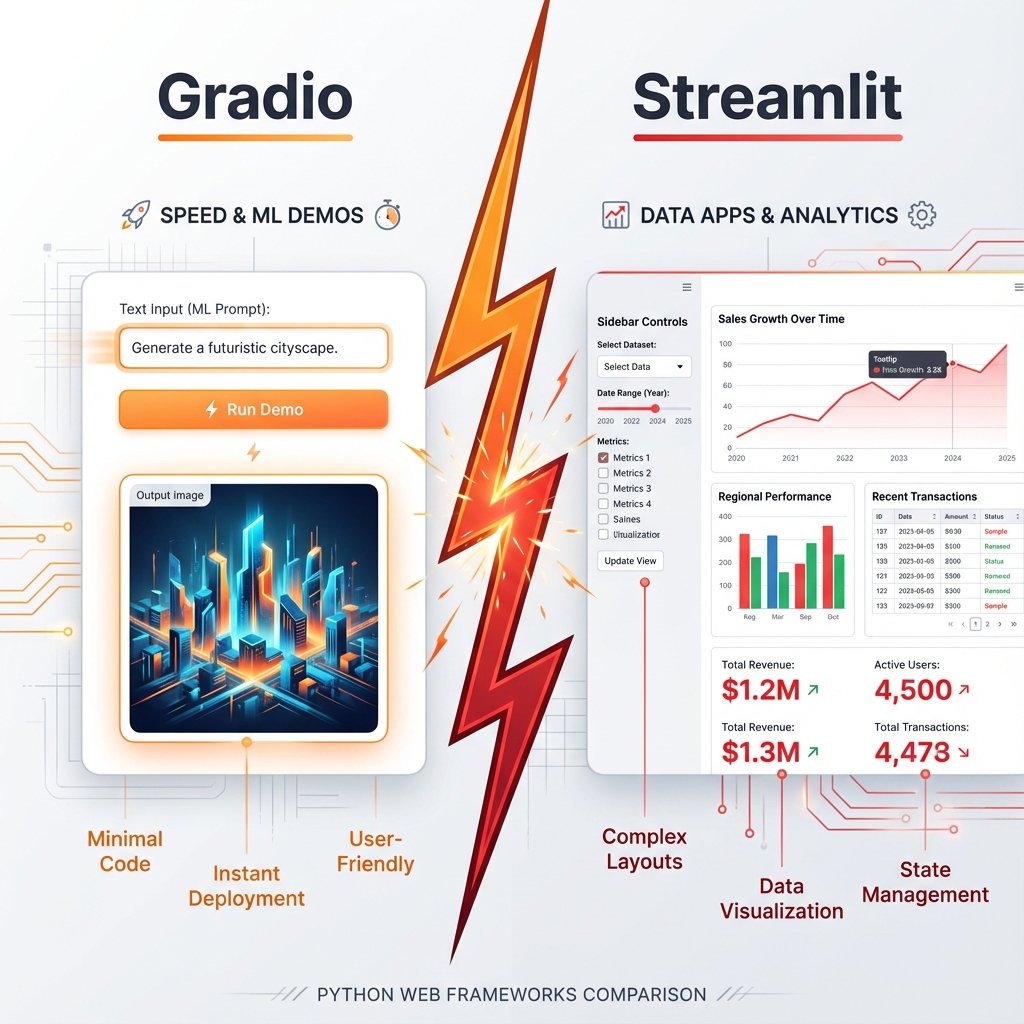
Gradio vs Streamlit : Première vue
Gradio (créé par Hugging Face) :
- 🎯 Focus : Interfaces ML ultra-rapides
- 📦 Philosophie : Moins de code, plus de magie
- 🚀 Temps dev : 5-30 minutes
Streamlit :
- 🎯 Focus : Apps data science complètes
- 📦 Philosophie : Control total, flexibilité
- 🚀 Temps dev : 1-4 heures
Exemple Hello World :
Gradio (3 lignes) :
import gradio as gr
gr.Interface(fn=lambda x: x.upper(), inputs="text", outputs="text").launch()
# Interface complète en 3 lignes !
Streamlit (5 lignes) :
import streamlit as st
text = st.text_input("Input")
if text:
    st.write(text.upper())
# Plus verbeux mais plus flexible
Gradio : ML interfaces en 5 lignes
Installation
pip install gradio
Philosophie et design
Gradio = Interface Builder pour ML :
- Composants prêts : Textbox, Image, Audio, Video, etc.
- Layout automatique
- Zero HTML/CSS
Chatbot simple
import gradio as gr
import openai

client = openai.OpenAI(api_key="sk-...")

def chat(message, history):
    """
    Chatbot avec ChatGPT
    history = [(user_msg, bot_msg), ...]
    """
    # Convertir history en format OpenAI
    messages = [{"role": "system", "content": "Tu es un assistant IA."}]

    for user_msg, bot_msg in history:
        messages.append({"role": "user", "content": user_msg})
        messages.append({"role": "assistant", "content": bot_msg})

    messages.append({"role": "user", "content": message})

    # Appel API
    response = client.chat.completions.create(
        model="gpt-4o-mini",
        messages=messages
    )

    return response.choices[0].message.content

# Interface Chatbot en 1 ligne !
gr.ChatInterface(fn=chat).launch()
Résultat : Interface complète avec :
- ✅ Historique conversationnel
- ✅ Zone de texte + bouton
- ✅ Mise en page responsive
- ✅ Dark mode automatique
Temps : 2 minutes de code.
Classification d’images
import gradio as gr
from transformers import pipeline

# Charger modèle Hugging Face
classifier = pipeline("image-classification", model="google/vit-base-patch16-224")

def classify_image(image):
    """
    Classifie image uploadée
    """
    results = classifier(image)

    # Formater résultats
    return {result['label']: result['score'] for result in results}

# Interface
demo = gr.Interface(
    fn=classify_image,
    inputs=gr.Image(type="pil"),
    outputs=gr.Label(num_top_classes=3),
    title="Classificateur d'Images IA",
    description="Upload une image pour identifier son contenu",
    examples=[
        ["exemple_chat.jpg"],
        ["exemple_chien.jpg"]
    ]
)

demo.launch()
Features automatiques :
- Upload image (drag & drop)
- Preview image
- Résultats avec barre de confiance
- Exemples cliquables
- Share link public
Génération d’images (Stable Diffusion)
import gradio as gr
from diffusers import StableDiffusionPipeline
import torch

# Charger modèle
pipe = StableDiffusionPipeline.from_pretrained(
    "stabilityai/stable-diffusion-2-1",
    torch_dtype=torch.float16
).to("cuda")

def generate_image(prompt, negative_prompt, steps, guidance):
    """
    Génère image depuis prompt
    """
    image = pipe(
        prompt=prompt,
        negative_prompt=negative_prompt,
        num_inference_steps=steps,
        guidance_scale=guidance
    ).images[0]

    return image

# Interface avec paramètres avancés
demo = gr.Interface(
    fn=generate_image,
    inputs=[
        gr.Textbox(label="Prompt", placeholder="A sunset over mountains..."),
        gr.Textbox(label="Negative Prompt", placeholder="blurry, low quality..."),
        gr.Slider(10, 100, value=50, label="Steps"),
        gr.Slider(1, 20, value=7.5, label="Guidance Scale")
    ],
    outputs=gr.Image(label="Generated Image"),
    title="Stable Diffusion Generator",
    allow_flagging="never"  # Pas de bouton flag
)

demo.launch(share=True)  # Lien public temporaire
Composants Gradio essentiels
import gradio as gr

# Inputs
gr.Textbox()           # Zone de texte
gr.Number()            # Nombre
gr.Slider()            # Curseur
gr.Checkbox()          # Case à cocher
gr.Radio()             # Boutons radio
gr.Dropdown()          # Menu déroulant
gr.Image()             # Upload image
gr.Audio()             # Upload audio
gr.Video()             # Upload vidéo
gr.File()              # Upload fichier

# Outputs
gr.Textbox()           # Texte
gr.Label()             # Labels avec scores
gr.Image()             # Afficher image
gr.Audio()             # Player audio
gr.Video()             # Player vidéo
gr.JSON()              # Afficher JSON
gr.HTML()              # HTML custom
gr.Plot()              # Graphique Matplotlib/Plotly

# Layouts
gr.Row()               # Ligne horizontale
gr.Column()            # Colonne verticale
gr.Tab()               # Onglets
gr.Accordion()         # Sections pliables
Layout avancé
import gradio as gr

def process(text, temp):
    return f"Processed: {text} (temp={temp})"

with gr.Blocks() as demo:
    gr.Markdown("# Mon Application IA")

    with gr.Tab("Tab 1"):
        with gr.Row():
            with gr.Column(scale=2):
                input_text = gr.Textbox(label="Input")
                temp_slider = gr.Slider(0, 1, value=0.7, label="Temperature")

            with gr.Column(scale=1):
                output = gr.Textbox(label="Output")

        btn = gr.Button("Process")
        btn.click(fn=process, inputs=[input_text, temp_slider], outputs=output)

    with gr.Tab("Tab 2"):
        gr.Markdown("Another tab")

demo.launch()
gr.Blocks() : Control total du layout vs gr.Interface() (automatique).
Intégration Hugging Face native
import gradio as gr

# Charger modèle HF directement
demo = gr.load("openai/whisper-large-v3")  # Transcription audio
demo.launch()

# Ou pour génération texte
demo = gr.load("mistralai/Mistral-7B-Instruct-v0.2")
demo.launch()
Magie : Gradio télécharge et wrappe le modèle automatiquement !
Streamlit : Data apps complètes
Installation
pip install streamlit
Philosophie et design
Streamlit = Script Python → App Web :
- Réexécution du script à chaque interaction
- State management intégré
- Widgets riches
Chatbot ChatGPT
import streamlit as st
import openai

# Config page
st.set_page_config(page_title="ChatGPT Clone", page_icon="💬")

# Titre
st.title("💬 ChatGPT Clone")

# Initialiser session state
if "messages" not in st.session_state:
    st.session_state.messages = []

# Afficher historique
for message in st.session_state.messages:
    with st.chat_message(message["role"]):
        st.markdown(message["content"])

# Input utilisateur
if prompt := st.chat_input("Votre message"):
    # Ajouter message user
    st.session_state.messages.append({"role": "user", "content": prompt})

    with st.chat_message("user"):
        st.markdown(prompt)

    # Générer réponse
    with st.chat_message("assistant"):
        client = openai.OpenAI(api_key=st.secrets["OPENAI_API_KEY"])

        stream = client.chat.completions.create(
            model="gpt-4o-mini",
            messages=st.session_state.messages,
            stream=True
        )

        response = st.write_stream(stream)

    # Sauvegarder réponse
    st.session_state.messages.append({"role": "assistant", "content": response})
Features :
- ✅ Streaming natif (texte apparaît progressivement)
- ✅ Session state (mémoire entre interactions)
- ✅
st.chat_message(): Bubbles comme ChatGPT - ✅
st.secrets: Gestion sécurisée API keys
Lancer :
streamlit run app.py
Dashboard analytics
import streamlit as st
import pandas as pd
import plotly.express as px

st.set_page_config(layout="wide")  # Pleine largeur

st.title("📊 Dashboard Analytics")

# Sidebar
with st.sidebar:
    st.header("Filtres")
    date_range = st.date_input("Date Range", [])
    category = st.multiselect("Catégories", ["A", "B", "C"])

# Upload fichier
uploaded_file = st.file_uploader("Upload CSV", type="csv")

if uploaded_file:
    # Lire données
    df = pd.read_csv(uploaded_file)

    # Métriques
    col1, col2, col3 = st.columns(3)

    with col1:
        st.metric("Total Ventes", f"${df['sales'].sum():,.0f}", delta="+12%")

    with col2:
        st.metric("Clients", df['customer_id'].nunique(), delta="+5%")

    with col3:
        st.metric("Panier Moyen", f"${df['sales'].mean():.2f}", delta="-3%")

    # Graphiques
    st.subheader("Évolution dans le temps")
    fig = px.line(df, x='date', y='sales', title='Ventes Quotidiennes')
    st.plotly_chart(fig, use_container_width=True)

    # Tableau interactif
    st.subheader("Données")
    st.dataframe(df, use_container_width=True)

    # Télécharger résultats
    st.download_button(
        "Télécharger CSV filtré",
        df.to_csv(index=False),
        "filtered_data.csv",
        "text/csv"
    )
Composants Streamlit essentiels
import streamlit as st

# Text
st.title("Titre")
st.header("Header")
st.subheader("Subheader")
st.markdown("**Markdown**")
st.code("print('hello')", language="python")

# Inputs
text = st.text_input("Label")
number = st.number_input("Nombre", min_value=0)
slider = st.slider("Slider", 0, 100)
select = st.selectbox("Select", ["A", "B", "C"])
multi = st.multiselect("Multi", ["A", "B", "C"])
checkbox = st.checkbox("Checkbox")
radio = st.radio("Radio", ["A", "B"])
date = st.date_input("Date")
file = st.file_uploader("Upload")

# Outputs
st.write("N'importe quoi : text, df, chart...")
st.dataframe(df)              # Tableau interactif
st.table(df)                  # Tableau statique
st.json({"key": "value"})     # JSON
st.image("image.jpg")         # Image
st.audio("audio.mp3")         # Audio
st.video("video.mp4")         # Video

# Visualisations
st.line_chart(df)             # Simple
st.bar_chart(df)
st.area_chart(df)
st.plotly_chart(fig)          # Plotly (interactif)
st.pyplot(fig)                # Matplotlib

# Layout
col1, col2 = st.columns(2)    # Colonnes
with st.sidebar:              # Sidebar
    st.write("...")
tab1, tab2 = st.tabs(["Tab1", "Tab2"])
with st.expander("Details"):  # Pliable
    st.write("...")

# Actions
if st.button("Click me"):
    st.write("Clicked!")

# Forms (grouper inputs)
with st.form("my_form"):
    name = st.text_input("Name")
    submitted = st.form_submit_button("Submit")

    if submitted:
        st.write(f"Hello {name}")
Session state (mémoire)
import streamlit as st

# Initialiser state
if "counter" not in st.session_state:
    st.session_state.counter = 0

# Bouton increment
if st.button("Increment"):
    st.session_state.counter += 1

# Afficher
st.write(f"Counter: {st.session_state.counter}")

# Persist entre reruns
Use case : Historique chat, panier, étapes wizard, etc.
Caching (performance)
import streamlit as st
import pandas as pd

@st.cache_data  # Cache résultat
def load_data():
    # Opération lente (CSV 10GB, API, etc.)
    return pd.read_csv("huge_file.csv")

@st.cache_resource  # Cache objet (modèle ML)
def load_model():
    from transformers import pipeline
    return pipeline("sentiment-analysis")

# Utilisations
df = load_data()         # Exécute 1x, puis cache
model = load_model()     # Charge 1x, réutilise

st.write(df)
Différence :
@st.cache_data: Données (df, dict, list) - Sérializable@st.cache_resource: Objets (modèles, connexions DB) - Non-sérializable
Comparaison détaillée
Tableau comparatif
| Critère | Gradio | Streamlit |
|---|---|---|
| Courbe apprentissage | ⭐⭐⭐⭐⭐ Facile | ⭐⭐⭐⭐ Facile |
| Temps dev MVP | 5-30 min | 1-4h |
| Flexibilité layout | ⭐⭐⭐ Limitée | ⭐⭐⭐⭐⭐ Totale |
| Focus ML/IA | ⭐⭐⭐⭐⭐ Natif | ⭐⭐⭐⭐ Bon |
| Data science | ⭐⭐⭐ OK | ⭐⭐⭐⭐⭐ Excellent |
| Composants | 20+ basiques | 50+ riches |
| Performance | ⭐⭐⭐⭐ Bon | ⭐⭐⭐ Rerun lent |
| Déploiement | HF Spaces (gratuit) | Streamlit Cloud (gratuit) |
| Communauté | 🔥 HuggingFace | 🔥🔥 Plus large |
| Customisation CSS | ❌ Limité | ✅ Possible |
| Multi-page | ⚠️ Tabs | ✅ Natif |
Quand utiliser Gradio
✅ Demos ML rapides :
- Prototyper interface modèle en 5 min
- Partager modèle avec collègues
- Hackathons
✅ Hugging Face workflows :
- Modèles HF Hub
- Déployer sur HF Spaces
- Communauté ML
✅ Interfaces simples :
- Input → Modèle → Output
- Pas besoin dashboard complexe
Exemples :
- Chatbot
- Classification image/texte
- Génération (texte, image, audio)
- OCR
- Transcription audio
Quand utiliser Streamlit
✅ Apps data science :
- Dashboards analytics
- Visualisations interactives
- Exploration de données
✅ Applications métier :
- Multi-pages
- Workflows complexes
- State management avancé
✅ Intégrations :
- DBs (SQL, MongoDB)
- APIs externes
- Rapports PDF/Excel
Exemples :
- Dashboard ventes
- Outil de reporting
- App de prédiction avec historique
- Annotateur de données
- Admin panel
Cas d’usage par scénario
Démo modèle pour client
Besoin : Montrer modèle IA fonctionnel en réunion demain.
Choix : Gradio ⭐⭐⭐⭐⭐
Pourquoi :
- Développement : 30 minutes
- Interface propre automatique
- Partage via lien public (
share=True)
Code :
import gradio as gr

def predict(text):
    # Votre modèle
    return model.predict(text)

gr.Interface(
    fn=predict,
    inputs="text",
    outputs="text",
    title="Demo pour Client X"
).launch(share=True)  # Lien public 72h
Dashboard analytics interne
Besoin : Outil interne pour analyser KPIs quotidiens.
Choix : Streamlit ⭐⭐⭐⭐⭐
Pourquoi :
- Graphiques riches (Plotly)
- Connexion DB
- Multi-pages (Overview, Details, Settings)
- Export CSV/PDF
Chatbot support client
Tie : Les deux fonctionnent.
Gradio :
gr.ChatInterface(fn=chat_function).launch()
# 1 ligne, simple
Streamlit :
# Plus de code mais:
# - Streaming natif
# - Customisation messages
# - Intégration DB tickets
Recommandation :
- Prototype : Gradio
- Production : Streamlit (plus de contrôle)
Outil d’annotation de données
Besoin : Labelliser images/textes pour ML.
Choix : Streamlit ⭐⭐⭐⭐⭐
Pourquoi :
- Navigation entre samples
- Sauvegarder progressivement (session state)
- Statistiques en temps réel
Gradio : Possible mais moins adapté.
Exemples pratiques
RAG question-answering (Gradio)
import gradio as gr
from langchain.vectorstores import Chroma
from langchain.embeddings import OpenAIEmbeddings
from langchain.chat_models import ChatOpenAI
from langchain.chains import RetrievalQA

# Setup RAG
vectorstore = Chroma(
    persist_directory="./chroma_db",
    embedding_function=OpenAIEmbeddings()
)

qa_chain = RetrievalQA.from_chain_type(
    llm=ChatOpenAI(model="gpt-4o-mini"),
    retriever=vectorstore.as_retriever(search_kwargs={"k": 3})
)

def answer_question(question):
    """
    RAG Q&A avec sources
    """
    result = qa_chain({"query": question})
    answer = result['result']

    # Récupérer sources
    docs = vectorstore.similarity_search(question, k=3)
    sources = "\n\n".join([f"**Source {i+1}:**\n{doc.page_content[:200]}..."
                           for i, doc in enumerate(docs)])

    return answer, sources

# Interface
demo = gr.Interface(
    fn=answer_question,
    inputs=gr.Textbox(label="Question", placeholder="Posez votre question..."),
    outputs=[
        gr.Textbox(label="Réponse"),
        gr.Markdown(label="Sources")
    ],
    title="RAG Question-Answering",
    description="Posez des questions sur nos documents",
    examples=[
        ["Qu'est-ce que le RAG ?"],
        ["Comment fonctionne LangChain ?"]
    ]
)

demo.launch()
Comparateur de modèles (Streamlit)
import streamlit as st
import openai
import anthropic

st.title("🤖 Comparateur de Modèles LLM")

# Sidebar : Config
with st.sidebar:
    st.header("Configuration")
    models = st.multiselect(
        "Modèles à comparer",
        ["GPT-4o", "GPT-4o mini", "Claude 3 Opus", "Claude 3 Sonnet"],
        default=["GPT-4o mini", "Claude 3 Sonnet"]
    )
    temperature = st.slider("Temperature", 0.0, 1.0, 0.7)

# Input
prompt = st.text_area("Prompt", height=150)

if st.button("Comparer"):
    cols = st.columns(len(models))

    for i, model in enumerate(models):
        with cols[i]:
            st.subheader(model)

            with st.spinner(f"Génération {model}..."):
                if "GPT" in model:
                    client = openai.OpenAI()
                    response = client.chat.completions.create(
                        model="gpt-4o" if "4o" in model else "gpt-4o-mini",
                        messages=[{"role": "user", "content": prompt}],
                        temperature=temperature
                    )
                    output = response.choices[0].message.content
                    tokens = response.usage.total_tokens
                    cost = tokens * 0.00001  # Approximation

                elif "Claude" in model:
                    client = anthropic.Anthropic()
                    response = client.messages.create(
                        model="claude-3-opus-20240229" if "Opus" in model else "claude-3-sonnet-20240229",
                        max_tokens=1024,
                        messages=[{"role": "user", "content": prompt}],
                        temperature=temperature
                    )
                    output = response.content[0].text
                    tokens = response.usage.input_tokens + response.usage.output_tokens
                    cost = tokens * 0.000015

                # Afficher
                st.markdown(output)
                st.caption(f"Tokens: {tokens} | Coût: ${cost:.4f}")
Déploiement
Hugging Face Spaces (Gradio)
1. Créer Space
# Sur huggingface.co/new-space
Name: my-gradio-app
SDK: Gradio
2. Structure fichiers
my-gradio-app/
├── app.py          # Code Gradio
├── requirements.txt
└── README.md
3. app.py
import gradio as gr

def greet(name):
    return f"Hello {name}!"

demo = gr.Interface(fn=greet, inputs="text", outputs="text")
demo.launch()
4. requirements.txt
gradio
openai
transformers
5. Push
git clone https://huggingface.co/spaces/username/my-gradio-app
cd my-gradio-app
# Ajouter fichiers
git add .
git commit -m "Initial commit"
git push
Résultat : App live sur https://huggingface.co/spaces/username/my-gradio-app
Gratuit : CPU, GPU payant ($0.60/h).
Streamlit Cloud (Streamlit)
1. Repository GitHub
my-streamlit-app/
├── streamlit_app.py   # DOIT s'appeler streamlit_app.py
├── requirements.txt
└── .streamlit/
    └── secrets.toml    # API keys (local seulement)
2. Déployer
- Aller sur streamlit.io/cloud
- Connect GitHub repo
- Deploy
3. Secrets (API keys)
- Dashboard Streamlit Cloud → App Settings → Secrets
- Ajouter:
OPENAI_API_KEY = "sk-..."
Accès dans code :
import streamlit as st
api_key = st.secrets["OPENAI_API_KEY"]
Gratuit : 1 app, ressources limitées.
Alternatives déploiement
Docker :
FROM python:3.11

WORKDIR /app
COPY requirements.txt .
RUN pip install -r requirements.txt

COPY . .

# Gradio
CMD ["python", "app.py"]

# OU Streamlit
# CMD ["streamlit", "run", "streamlit_app.py", "--server.port=8501"]
Cloud Providers :
- Railway : Gratuit (limité)
- Render : Gratuit (sleep après inactivité)
- AWS/GCP/Azure : Payant, scalable
Performance et scalabilité
Gradio : Performance
Avantages :
- ✅ Léger (FastAPI backend)
- ✅ Websockets pour streaming
- ✅ Queue automatique (file d’attente)
Limites :
- ⚠️ 1 worker par défaut
- ⚠️ Pas de load balancing natif
Optimisations :
demo.queue(max_size=10)  # File attente
demo.launch(
    server_port=7860,
    server_name="0.0.0.0",
    share=False,
    inbrowser=False
)
Production : Déployer derrière nginx + gunicorn.
Streamlit : Performance
Problème : Réexécute tout le script à chaque interaction.
Solutions :
1. Caching agressif
@st.cache_data
def expensive_computation(param):
    # Calcul 10s
    return result

# Exécute 1x, puis cache par param
2. Session state minimal
# Éviter
if "huge_df" not in st.session_state:
    st.session_state.huge_df = load_huge_df()  # Chargé chaque rerun

# Préférer
@st.cache_data
def get_df():
    return load_huge_df()

df = get_df()  # Cache global
3. Fragments (Streamlit 1.30+)
@st.fragment
def expensive_chart():
    # Seulement ce fragment rerun quand update
    fig = create_complex_plot()
    st.plotly_chart(fig)
Scalabilité
Gradio :
- Multi-instances (k8s, Docker Swarm)
- Load balancer devant
Streamlit :
- Streamlit Cloud : Auto-scale payant
- Self-hosted : Plusieurs instances + LB
Recommandation production :
- Trafic faible (<100 users/jour) : Gratuit (HF Spaces, Streamlit Cloud)
- Trafic moyen : VPS ($10-50/mois)
- Trafic élevé : Cluster k8s, cloud scaling
Conclusion
Résumé choix
Gradio si :
- ✅ Démo ML rapide
- ✅ Prototype en minutes
- ✅ Intégration HuggingFace
- ✅ Interface simple input→output
Streamlit si :
- ✅ App data science complète
- ✅ Dashboard analytics
- ✅ Multi-pages
- ✅ Besoin flexibilité layout
Les deux :
- ✅ Pas de JavaScript requis
- ✅ Déploiement gratuit
- ✅ Communautés actives
- ✅ Open source
Combinaison possible
Oui ! Utiliser les deux dans même projet :
# gradio_tab.py
import gradio as gr

def ml_inference(input):
    return model.predict(input)

gradio_app = gr.Interface(fn=ml_inference, inputs="text", outputs="text")

# streamlit_app.py
import streamlit as st
from gradio_tab import gradio_app

tab1, tab2 = st.tabs(["Dashboard", "ML Demo"])

with tab1:
    st.write("Streamlit dashboard...")

with tab2:
    # Embed Gradio dans Streamlit !
    st.components.v1.html(gradio_app.launch(inline=True), height=600)
Ressources
Documentation :
- Gradio : https://gradio.app/docs/
- Streamlit : https://docs.streamlit.io/
Galeries d’exemples :
- Hugging Face Spaces : https://huggingface.co/spaces
- Streamlit Gallery : https://streamlit.io/gallery
Communautés :
- Discord Gradio
- Forum Streamlit
Articles connexes :