LangServe : Déployer vos applications LangChain en APIs REST production-ready
Vous avez construit une super application LangChain en local. Maintenant, comment la rendre accessible via une API ? LangServe résout ce défi en transformant n’importe quelle chain en API REST production-ready en quelques lignes de code. Dans cet article, nous explorons comment déployer vos applications LangChain du développement à la production.
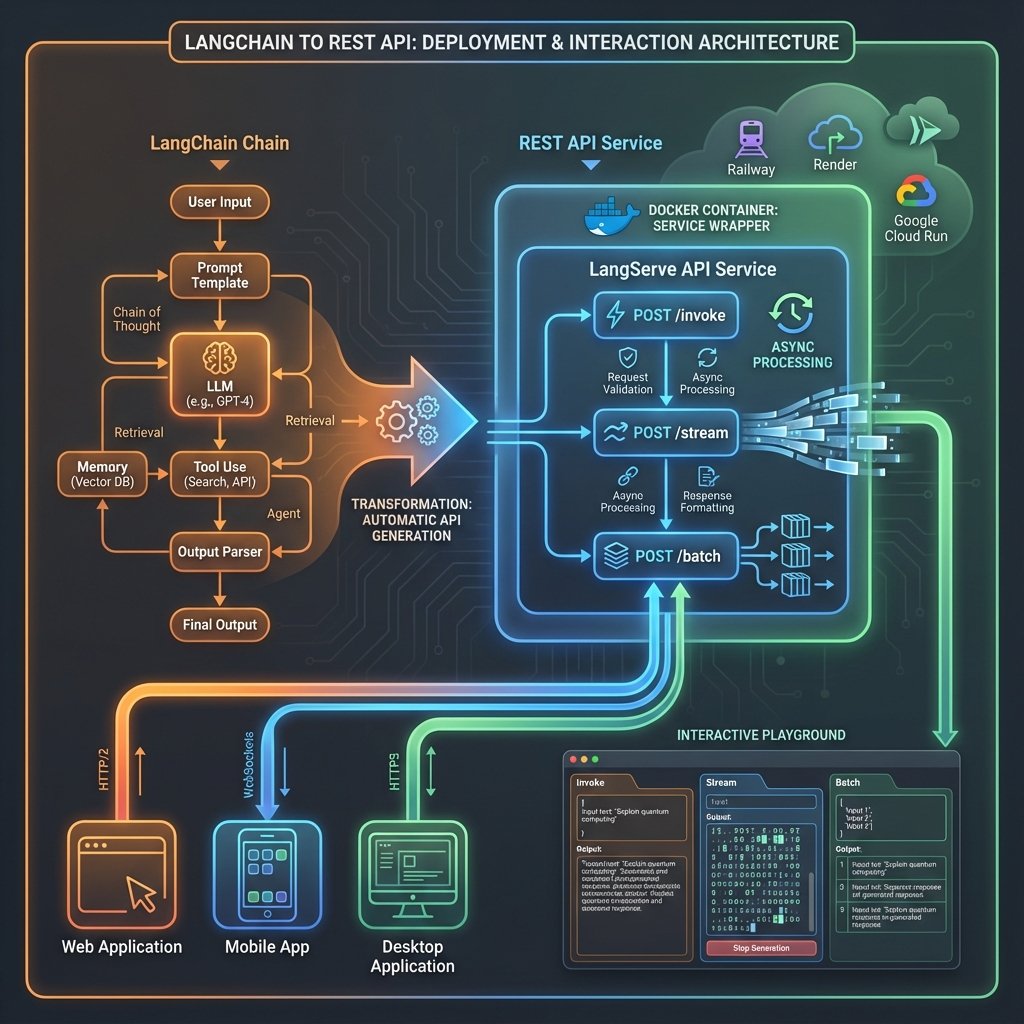
Qu’est-ce que LangServe ?
LangServe est le framework officiel de LangChain pour déployer des chains, agents et runnables comme des APIs REST. Construit sur FastAPI, il offre :
- 🚀 Déploiement en 1 ligne :
add_routes(app, chain, path="/chat") - 🔄 Endpoints automatiques : invoke, stream, batch, playground
- 📡 Streaming natif : Responses token par token
- 🎮 Playground interactif : Interface de test intégrée
- 🔒 Production-ready : CORS, auth, monitoring, Docker
- 📚 Client officiel : SDK Python et TypeScript
- ⚡ Performance : Async par défaut, batching optimisé
Le problème sans LangServe
Approche manuelle avec FastAPI :
from fastapi import FastAPI
from langchain_openai import ChatOpenAI

app = FastAPI()
llm = ChatOpenAI()

@app.post("/chat")
async def chat(request: dict):
    # Gérer la sérialisation
    # Gérer le streaming manuellement
    # Implémenter batch
    # Créer un playground
    # Gérer les erreurs
    # ... des heures de code boilerplate
    pass
Avec LangServe :
from fastapi import FastAPI
from langserve import add_routes
from langchain_openai import ChatOpenAI

app = FastAPI()
llm = ChatOpenAI()

add_routes(app, llm, path="/chat")  # C'est tout !
Installation
# Installation de base
pip install langserve[all]

# Ou minimal
pip install langserve

# Pour le serveur
pip install "langserve[server]"

# Pour le client
pip install "langserve[client]"
Dépendances incluses :
- FastAPI
- Pydantic v2
- SSE Starlette (pour streaming)
- httpx (pour client)
Premier exemple : Déployer un LLM simple
Serveur
from fastapi import FastAPI
from langserve import add_routes
from langchain_openai import ChatOpenAI

# 1. Créer l'app FastAPI
app = FastAPI(
    title="Mon API LangChain",
    version="1.0",
    description="API pour un chatbot IA"
)

# 2. Créer votre chain
llm = ChatOpenAI(model="gpt-4o-mini", temperature=0.7)

# 3. Ajouter la route (une seule ligne !)
add_routes(
    app,
    llm,
    path="/chat"
)

# 4. Lancer le serveur
if __name__ == "__main__":
    import uvicorn
    uvicorn.run(app, host="0.0.0.0", port=8000)
Lancer :
python server.py
# ou
uvicorn server:app --reload
http://localhost:8000 avec documentation interactive sur /docs !Endpoints générés automatiquement
LangServe crée ces endpoints pour vous :
| Endpoint | Méthode | Description |
|---|---|---|
/chat/invoke | POST | Invoke synchrone (une requête) |
/chat/batch | POST | Batch (plusieurs requêtes) |
/chat/stream | POST | Streaming (réponse token par token) |
/chat/stream_log | POST | Streaming avec logs détaillés |
/chat/input_schema | GET | Schema JSON des inputs |
/chat/output_schema | GET | Schema JSON des outputs |
/chat/config_schema | GET | Schema de configuration |
/chat/playground | GET | Interface de test interactive |
Documentation automatique :
- Swagger UI :
http://localhost:8000/docs - ReDoc :
http://localhost:8000/redoc
Client Python
from langserve import RemoteRunnable

# Connexion au serveur
chat = RemoteRunnable("http://localhost:8000/chat")

# Invoke
response = chat.invoke("Explique la photosynthèse")
print(response.content)

# Streaming
for chunk in chat.stream("Raconte une histoire"):
    print(chunk.content, end="", flush=True)

# Batch
responses = chat.batch([
    "Question 1",
    "Question 2",
    "Question 3"
])
Playground interactif
Ouvrez
http://localhost:8000/chat/playground dans votre navigateur pour une interface de test avec textarea, streaming temps réel, historique des requêtes et modification des paramètres.Déployer des chains complexes
Exemple 1 : RAG API
from fastapi import FastAPI
from langserve import add_routes
from langchain_openai import ChatOpenAI, OpenAIEmbeddings
from langchain_community.vectorstores import FAISS
from langchain.chains import RetrievalQA

app = FastAPI(title="RAG API")

# Setup RAG
vectorstore = FAISS.load_local(
    "./vectorstore",
    OpenAIEmbeddings(),
    allow_dangerous_deserialization=True
)

llm = ChatOpenAI(model="gpt-4")

qa_chain = RetrievalQA.from_chain_type(
    llm=llm,
    retriever=vectorstore.as_retriever(search_kwargs={"k": 3}),
    return_source_documents=True
)

# Déployer
add_routes(
    app,
    qa_chain,
    path="/rag",
    enable_feedback_endpoint=True  # Active le feedback utilisateur
)

if __name__ == "__main__":
    import uvicorn
    uvicorn.run(app, host="0.0.0.0", port=8000)
Utilisation :
from langserve import RemoteRunnable

rag = RemoteRunnable("http://localhost:8000/rag")

result = rag.invoke({
    "query": "Qu'est-ce que le fine-tuning ?"
})

print(result["result"])
print("\nSources:")
for doc in result["source_documents"]:
    print(f"- {doc.metadata['source']}")
Exemple 2 : Agent API
from fastapi import FastAPI
from langserve import add_routes
from langchain_openai import ChatOpenAI
from langchain.agents import AgentExecutor, create_react_agent
from langchain_community.tools import DuckDuckGoSearchRun
from langchain.tools import Tool

app = FastAPI(title="Agent API")

# Outils
search = DuckDuckGoSearchRun()
tools = [
    Tool(
        name="Search",
        func=search.run,
        description="Recherche sur le web pour informations actuelles"
    )
]

# Agent
llm = ChatOpenAI(model="gpt-4", temperature=0)
agent = create_react_agent(llm, tools, prompt)
agent_executor = AgentExecutor(
    agent=agent,
    tools=tools,
    verbose=True,
    max_iterations=5
)

# Déployer
add_routes(app, agent_executor, path="/agent")

if __name__ == "__main__":
    import uvicorn
    uvicorn.run(app, host="0.0.0.0", port=8000)
Exemple 3 : Chain personnalisée avec prompts
from fastapi import FastAPI
from langserve import add_routes
from langchain_openai import ChatOpenAI
from langchain_core.prompts import ChatPromptTemplate
from langchain_core.output_parsers import StrOutputParser

app = FastAPI()

# Chain avec prompt template
prompt = ChatPromptTemplate.from_messages([
    ("system", "Tu es un expert en {domain}."),
    ("human", "{question}")
])

llm = ChatOpenAI(model="gpt-4o-mini")
output_parser = StrOutputParser()

chain = prompt | llm | output_parser

# Déployer
add_routes(app, chain, path="/expert")

if __name__ == "__main__":
    import uvicorn
    uvicorn.run(app, host="0.0.0.0", port=8000)
Client :
from langserve import RemoteRunnable

expert = RemoteRunnable("http://localhost:8000/expert")

response = expert.invoke({
    "domain": "astronomie",
    "question": "Qu'est-ce qu'un trou noir ?"
})

print(response)
Streaming avancé
Streaming côté serveur
from fastapi import FastAPI
from langserve import add_routes
from langchain_openai import ChatOpenAI

app = FastAPI()

# LLM avec streaming activé
llm = ChatOpenAI(
    model="gpt-4",
    streaming=True,  # Important !
    temperature=0.7
)

add_routes(app, llm, path="/chat")
Client avec streaming
from langserve import RemoteRunnable

chat = RemoteRunnable("http://localhost:8000/chat")

# Streaming token par token
for chunk in chat.stream("Raconte une longue histoire"):
    print(chunk.content, end="", flush=True)

print()  # Nouvelle ligne
Streaming avec événements
# Stream avec logs détaillés
for event in chat.stream_log("Question complexe"):
    # event contient : type, data, metadata
    if event["type"] == "chunk":
        print(event["data"]["content"], end="")
Interface web avec streaming
<!DOCTYPE html>
<html>
<head>
    <title>Chat Streaming</title>
</head>
<body>
    <textarea id="question" placeholder="Votre question..."></textarea>
    <button onclick="askQuestion()">Envoyer</button>
    <div id="response"></div>

    <script>
        async function askQuestion() {
            const question = document.getElementById('question').value;
            const responseDiv = document.getElementById('response');
            responseDiv.innerHTML = '';

            const response = await fetch('http://localhost:8000/chat/stream', {
                method: 'POST',
                headers: {'Content-Type': 'application/json'},
                body: JSON.stringify({input: question})
            });

            const reader = response.body.getReader();
            const decoder = new TextDecoder();

            while (true) {
                const {done, value} = await reader.read();
                if (done) break;

                const chunk = decoder.decode(value);
                const lines = chunk.split('\n');

                for (const line of lines) {
                    if (line.startsWith('data: ')) {
                        const data = JSON.parse(line.slice(6));
                        responseDiv.innerHTML += data.content;
                    }
                }
            }
        }
    </script>
</body>
</html>
Configuration avancée
CORS (Cross-Origin Resource Sharing)
from fastapi import FastAPI
from fastapi.middleware.cors import CORSMiddleware
from langserve import add_routes

app = FastAPI()

# Configuration CORS
app.add_middleware(
    CORSMiddleware,
    allow_origins=["http://localhost:3000"],  # Votre frontend
    allow_credentials=True,
    allow_methods=["*"],
    allow_headers=["*"],
)

add_routes(app, chain, path="/chat")
Authentication
from fastapi import FastAPI, Depends, HTTPException, Security
from fastapi.security import HTTPBearer, HTTPAuthorizationCredentials
from langserve import add_routes

app = FastAPI()
security = HTTPBearer()

def verify_token(credentials: HTTPAuthorizationCredentials = Security(security)):
    """Vérifie le token d'authentification"""
    token = credentials.credentials

    # Vérification (simplifiée)
    if token != "secret-token-123":
        raise HTTPException(status_code=401, detail="Token invalide")

    return token

# Route protégée
add_routes(
    app,
    chain,
    path="/chat",
    dependencies=[Depends(verify_token)]  # Authentification requise
)
Client avec auth :
from langserve import RemoteRunnable

chat = RemoteRunnable(
    "http://localhost:8000/chat",
    headers={"Authorization": "Bearer secret-token-123"}
)

response = chat.invoke("Question")
Rate Limiting
Production : Implémentez toujours un rate limiting pour éviter les abus et contrôler les coûts API.
from fastapi import FastAPI, Request
from slowapi import Limiter, _rate_limit_exceeded_handler
from slowapi.util import get_remote_address
from slowapi.errors import RateLimitExceeded
from langserve import add_routes

limiter = Limiter(key_func=get_remote_address)
app = FastAPI()
app.state.limiter = limiter
app.add_exception_handler(RateLimitExceeded, _rate_limit_exceeded_handler)

# Option 1 : Rate limiting sur endpoint personnalisé
@app.post("/custom/invoke")
@limiter.limit("10/minute")  # 10 requêtes par minute
async def limited_invoke(request: Request):
    """Endpoint personnalisé avec rate limiting"""
    data = await request.json()

    # Invoke la chain
    result = await chain.ainvoke(data.get("input", {}))

    return {"output": result}

# Option 2 : Utiliser add_routes avec rate limiting global
# via middleware (recommandé pour production)
add_routes(app, chain, path="/chat")
Configuration personnalisée
from langserve import add_routes

add_routes(
    app,
    chain,
    path="/chat",
    enabled_endpoints=["invoke", "stream"],  # Désactive batch
    input_type=dict,  # Type d'input
    output_type=str,  # Type d'output
    config_keys=["metadata", "tags"],  # Clés de config autorisées
    enable_feedback_endpoint=True,  # Endpoint de feedback
    enable_public_trace_link_endpoint=False,  # Pas de liens publics
    playground_type="default"  # Type de playground
)
Déploiement en production
Avec Docker
Dockerfile :
FROM python:3.11-slim

WORKDIR /app

# Dépendances
COPY requirements.txt .
RUN pip install --no-cache-dir -r requirements.txt

# Code
COPY . .

# Port
EXPOSE 8000

# Variables d'environnement
ENV OPENAI_API_KEY=""

# Commande
CMD ["uvicorn", "server:app", "--host", "0.0.0.0", "--port", "8000"]
requirements.txt :
langchain
langchain-openai
langserve[all]
uvicorn[standard]
python-dotenv
docker-compose.yml :
version: '3.8'

services:
  api:
    build: .
    ports:
      - "8000:8000"
    environment:
      - OPENAI_API_KEY=${OPENAI_API_KEY}
      - LANGCHAIN_TRACING_V2=true
      - LANGCHAIN_API_KEY=${LANGCHAIN_API_KEY}
    volumes:
      - ./vectorstore:/app/vectorstore
    restart: unless-stopped
Commandes :
# Build
docker-compose build

# Run
docker-compose up -d

# Logs
docker-compose logs -f

# Stop
docker-compose down
Déploiement sur cloud
Railway
# Installation
npm install -g @railway/cli

# Login
railway login

# Initialisation
railway init

# Déploiement
railway up
railway.json :
{
  "build": {
    "builder": "DOCKERFILE"
  },
  "deploy": {
    "startCommand": "uvicorn server:app --host 0.0.0.0 --port $PORT",
    "restartPolicyType": "ON_FAILURE"
  }
}
Render
render.yaml :
services:
  - type: web
    name: langchain-api
    env: python
    buildCommand: pip install -r requirements.txt
    startCommand: uvicorn server:app --host 0.0.0.0 --port $PORT
    envVars:
      - key: OPENAI_API_KEY
        sync: false
      - key: PYTHON_VERSION
        value: 3.11.0
Google Cloud Run
# Build et push
gcloud builds submit --tag gcr.io/PROJECT_ID/langchain-api

# Déploiement
gcloud run deploy langchain-api \
  --image gcr.io/PROJECT_ID/langchain-api \
  --platform managed \
  --region us-central1 \
  --allow-unauthenticated \
  --set-env-vars OPENAI_API_KEY=$OPENAI_API_KEY
Optimisation production
Workers et concurrence
# Multiple workers (CPU-bound)
uvicorn server:app --workers 4 --host 0.0.0.0 --port 8000

# Avec Gunicorn
gunicorn server:app -w 4 -k uvicorn.workers.UvicornWorker --bind 0.0.0.0:8000
Caching
from fastapi import FastAPI
from langserve import add_routes
from langchain.cache import InMemoryCache
from langchain.globals import set_llm_cache

app = FastAPI()

# Cache global pour LLM
set_llm_cache(InMemoryCache())

add_routes(app, chain, path="/chat")
Health check
from fastapi import FastAPI

app = FastAPI()

@app.get("/health")
async def health_check():
    """Endpoint de santé pour load balancers"""
    return {
        "status": "healthy",
        "version": "1.0.0"
    }

add_routes(app, chain, path="/chat")
Monitoring et logging
Logging structuré
import logging
from fastapi import FastAPI, Request
import time

# Configuration logging
logging.basicConfig(
    level=logging.INFO,
    format='%(asctime)s - %(name)s - %(levelname)s - %(message)s'
)
logger = logging.getLogger(__name__)

app = FastAPI()

@app.middleware("http")
async def log_requests(request: Request, call_next):
    """Middleware pour logger toutes les requêtes"""
    start_time = time.time()

    response = await call_next(request)

    duration = time.time() - start_time

    logger.info(
        f"{request.method} {request.url.path} "
        f"- Status: {response.status_code} "
        f"- Duration: {duration:.2f}s"
    )

    return response

add_routes(app, chain, path="/chat")
Métriques avec Prometheus
from fastapi import FastAPI
from prometheus_fastapi_instrumentator import Instrumentator

app = FastAPI()

# Instrumenter l'app
Instrumentator().instrument(app).expose(app)

add_routes(app, chain, path="/chat")

# Métriques disponibles sur /metrics
Intégration LangSmith
LangSmith permet de tracer automatiquement toutes vos requêtes pour debugging, monitoring et amélioration continue.
import os
from fastapi import FastAPI

# Configuration LangSmith
os.environ["LANGCHAIN_TRACING_V2"] = "true"
os.environ["LANGCHAIN_API_KEY"] = "ls-..."
os.environ["LANGCHAIN_PROJECT"] = "langserve-production"

app = FastAPI()

# Toutes les requêtes sont automatiquement tracées dans LangSmith
add_routes(app, chain, path="/chat")
Client avancé
Client Python complet
from langserve import RemoteRunnable
from typing import Iterator

class LangChainClient:
    """Client wrapper pour LangServe"""

    def __init__(self, base_url: str, api_key: str = None):
        self.base_url = base_url
        self.headers = {}

        if api_key:
            self.headers["Authorization"] = f"Bearer {api_key}"

        self.chat = RemoteRunnable(
            f"{base_url}/chat",
            headers=self.headers
        )

    def ask(self, question: str) -> str:
        """Question simple (invoke)"""
        response = self.chat.invoke(question)
        return response.content

    def ask_stream(self, question: str) -> Iterator[str]:
        """Question avec streaming"""
        for chunk in self.chat.stream(question):
            yield chunk.content

    def ask_batch(self, questions: list[str]) -> list[str]:
        """Batch de questions"""
        responses = self.chat.batch(questions)
        return [r.content for r in responses]

# Utilisation
client = LangChainClient(
    base_url="http://localhost:8000",
    api_key="secret-token"
)

# Simple
answer = client.ask("Qu'est-ce que l'IA ?")
print(answer)

# Streaming
for chunk in client.ask_stream("Raconte une histoire"):
    print(chunk, end="", flush=True)

# Batch
answers = client.ask_batch([
    "Question 1",
    "Question 2",
    "Question 3"
])
Client TypeScript
import { RemoteRunnable } from "@langchain/core/runnables/remote";

// Configuration
const chat = new RemoteRunnable({
  url: "http://localhost:8000/chat",
  options: {
    headers: {
      "Authorization": "Bearer secret-token"
    }
  }
});

// Invoke
const response = await chat.invoke("Qu'est-ce que l'IA ?");
console.log(response);

// Streaming
const stream = await chat.stream("Raconte une histoire");
for await (const chunk of stream) {
  process.stdout.write(chunk.content);
}

// Batch
const responses = await chat.batch([
  "Question 1",
  "Question 2",
  "Question 3"
]);
Patterns de production
Multi-tenancy
from fastapi import FastAPI, Header, HTTPException

app = FastAPI()

# Chains par tenant
chains = {
    "tenant-1": create_chain(config_1),
    "tenant-2": create_chain(config_2),
}

@app.post("/chat/invoke")
async def multi_tenant_invoke(
    request: dict,
    x_tenant_id: str = Header(...)
):
    """Route avec sélection de chain par tenant"""

    if x_tenant_id not in chains:
        raise HTTPException(status_code=404, detail="Tenant non trouvé")

    chain = chains[x_tenant_id]
    result = await chain.ainvoke(request["input"])

    return {"output": result}
Fallback
from fastapi import FastAPI
from langserve import add_routes
from langchain_openai import ChatOpenAI
from langchain_anthropic import ChatAnthropic

app = FastAPI()

# LLM principal
primary_llm = ChatOpenAI(model="gpt-4", timeout=10)

# LLM de secours
fallback_llm = ChatAnthropic(model="claude-sonnet-4.5")

# Chain avec fallback automatique
chain = primary_llm.with_fallbacks([fallback_llm])

add_routes(app, chain, path="/chat")
Versioning
from fastapi import FastAPI
from langserve import add_routes

app = FastAPI()

# Version 1 (stable)
chain_v1 = create_chain_v1()
add_routes(app, chain_v1, path="/v1/chat")

# Version 2 (beta)
chain_v2 = create_chain_v2()
add_routes(app, chain_v2, path="/v2/chat")

# Latest (alias vers version stable)
add_routes(app, chain_v1, path="/chat")
Sécurité
Validation des inputs
from fastapi import FastAPI, HTTPException
from pydantic import BaseModel, Field, validator
from langserve import add_routes

app = FastAPI()

class ChatRequest(BaseModel):
    """Modèle validé pour les requêtes"""
    message: str = Field(..., min_length=1, max_length=2000)

    @validator('message')
    def validate_message(cls, v):
        # Pas de contenu malveillant
        forbidden = ["<script>", "DROP TABLE", "'; DELETE"]
        if any(bad in v for bad in forbidden):
            raise ValueError("Contenu suspect détecté")
        return v

@app.post("/chat/safe")
async def safe_chat(request: ChatRequest):
    """Endpoint avec validation stricte"""
    result = chain.invoke(request.message)
    return {"response": result}
Secrets management
Sécurité : Ne jamais commit les clés API dans le code. Utilisez des variables d’environnement ou un service de gestion de secrets.
import os
from dotenv import load_dotenv

# Charger depuis .env (dev)
load_dotenv()

# Ou depuis environment variables (prod)
OPENAI_API_KEY = os.getenv("OPENAI_API_KEY")
LANGCHAIN_API_KEY = os.getenv("LANGCHAIN_API_KEY")

# Validation
if not OPENAI_API_KEY:
    raise ValueError("OPENAI_API_KEY manquante")

# Utilisation sécurisée
llm = ChatOpenAI(api_key=OPENAI_API_KEY)
Troubleshooting
Problème : Timeout sur requêtes longues
Solution : Augmenter les timeouts
import uvicorn

# Configuration
config = uvicorn.Config(
    app,
    host="0.0.0.0",
    port=8000,
    timeout_keep_alive=300,  # 5 minutes
    timeout_graceful_shutdown=30
)

server = uvicorn.Server(config)
server.run()
Problème : Erreurs CORS
Solution : Configuration CORS correcte
from fastapi.middleware.cors import CORSMiddleware

app.add_middleware(
    CORSMiddleware,
    allow_origins=["*"],  # Ou liste spécifique
    allow_credentials=True,
    allow_methods=["*"],
    allow_headers=["*"],
    expose_headers=["*"]
)
Problème : Mémoire qui augmente
Solution : Limitation et nettoyage
import gc
from fastapi import FastAPI

app = FastAPI()

@app.middleware("http")
async def cleanup_middleware(request: Request, call_next):
    response = await call_next(request)

    # Forcer garbage collection périodiquement
    if request.url.path.endswith("/invoke"):
        gc.collect()

    return response
Comparaison : LangServe vs FastAPI pur
| Aspect | LangServe | FastAPI pur |
|---|---|---|
| Setup | 1 ligne de code | 50-100 lignes |
| Endpoints | Automatiques (invoke, stream, batch) | Manuels |
| Streaming | Natif SSE | Implémentation manuelle |
| Playground | Inclus | À créer |
| Client SDK | Officiel Python/TS | À créer |
| Sérialisation | Automatique | Manuelle |
| Documentation | Auto-générée | Manuelle |
| Flexibilité | Moyenne | Totale |
| Courbe d’apprentissage | Très faible | Moyenne |
| Maintenance | Faible | Élevée |
Cheat Sheet : Quick Reference
Commandes essentielles
# Installation
pip install langserve[all]

# Lancer serveur
uvicorn server:app --reload

# Avec workers
uvicorn server:app --workers 4

# Docker
docker-compose up -d
Code minimal
# Serveur
from fastapi import FastAPI
from langserve import add_routes
from langchain_openai import ChatOpenAI

app = FastAPI()
add_routes(app, ChatOpenAI(), path="/chat")

# Client
from langserve import RemoteRunnable
chat = RemoteRunnable("http://localhost:8000/chat")
print(chat.invoke("Hello"))
Endpoints par défaut
GET  /chat/playground          # Interface interactive
POST /chat/invoke              # Requête simple
POST /chat/batch               # Batch de requêtes
POST /chat/stream              # Streaming SSE
GET  /chat/input_schema        # Schema input
GET  /docs                     # Swagger UI
Exercices pratiques
Exercice 1 : API de traduction
Objectif : Créer une API qui traduit du texte en plusieurs langues.
Tâches :
- Créer une chain avec prompt template pour traduction
- Déployer avec LangServe sur
/translate - Ajouter validation (langues supportées)
- Implémenter batch pour traduire plusieurs textes
- Tester avec le playground
Code de départ :
from langchain_core.prompts import ChatPromptTemplate

prompt = ChatPromptTemplate.from_messages([
    ("system", "Tu es un traducteur expert. Traduis en {target_language}."),
    ("human", "{text}")
])

# TODO: Compléter l'implémentation
Exercice 2 : RAG API avec feedback
Objectif : Déployer un système RAG avec système de feedback utilisateur.
Tâches :
- Créer vectorstore depuis vos documents
- Configurer RetrievalQA chain
- Déployer avec
enable_feedback_endpoint=True - Implémenter logging des feedbacks
- Créer dashboard simple pour visualiser feedbacks
Exercice 3 : API multi-modèles
Objectif : API qui route vers différents LLMs selon le type de question.
Tâches :
- Créer classifier de questions (code, texte, math, etc.)
- Déployer plusieurs chains spécialisées
- Implémenter routing intelligent
- Ajouter fallback entre modèles
- Monitorer avec LangSmith
Conclusion
LangServe transforme le déploiement d’applications LangChain en rendant trivial ce qui était auparavant complexe. En une ligne de code, vous obtenez :
✅ API REST complète avec tous les endpoints nécessaires
✅ Streaming natif pour UX optimale
✅ Playground intégré pour tests rapides
✅ Client SDK officiel Python et TypeScript
✅ Production-ready avec monitoring, auth, CORS
✅ Déploiement facile Docker, cloud, serverless
Checklist de déploiement
- Code fonctionnel en local
- Variables d’environnement configurées
- Authentification implémentée
- Rate limiting activé
- CORS configuré correctement
- Logging structuré en place
- Health check endpoint créé
- Tests de charge effectués
- Monitoring configuré (LangSmith)
- Documentation API générée
- Dockerfile créé et testé
- Déployé sur plateforme cloud
- Alertes configurées
Prochaines étapes
Après avoir déployé avec LangServe :
- Ajoutez du monitoring avec LangSmith
- Implémentez des tests automatisés
- Configurez le CI/CD
- Optimisez les coûts avec caching
- Ajoutez des métriques business
Pour aller plus loin :
- Introduction à LangChain - Bases du framework
- RAG avec LangChain - Système de récupération
- Agents LangChain - Agents autonomes
- LangGraph - Workflows complexes
- LangSmith - Monitoring et production
- Guide Pratique - 40+ recettes
Concepts connexes :
- Embeddings - Vectorisation
- Tokens - Optimisation des coûts
- Transformers - Architecture LLMs
LangServe est l’outil indispensable pour passer du prototype au produit. Commencez simple avec une ligne de code, et ajoutez progressivement auth, monitoring, et optimisations au fur et à mesure de vos besoins.
Navigation
← Retour à la Formation LangChain | Module suivant : Mémoire Conversationnelle →