GPU Cloud pour IA : AWS, GCP, Azure, Lambda - Comparatif 2026
Le cloud GPU permet d’accéder à du hardware puissant sans investissement initial. Mais avec des dizaines de providers et des centaines d’options d’instances, comment choisir ?
Enjeux :
- Coûts : Le cloud peut devenir très cher (30k€/mois pour un cluster H100)
- Performance : Tous les providers ne se valent pas
- Lock-in : Éviter la dépendance à un seul fournisseur
- Disponibilité : GPU souvent en rupture de stock
Cet article compare les principaux providers cloud 2025 et vous aide à optimiser vos coûts. Pour un calcul détaillé du ROI cloud vs on-premise, consultez notre guide complet.
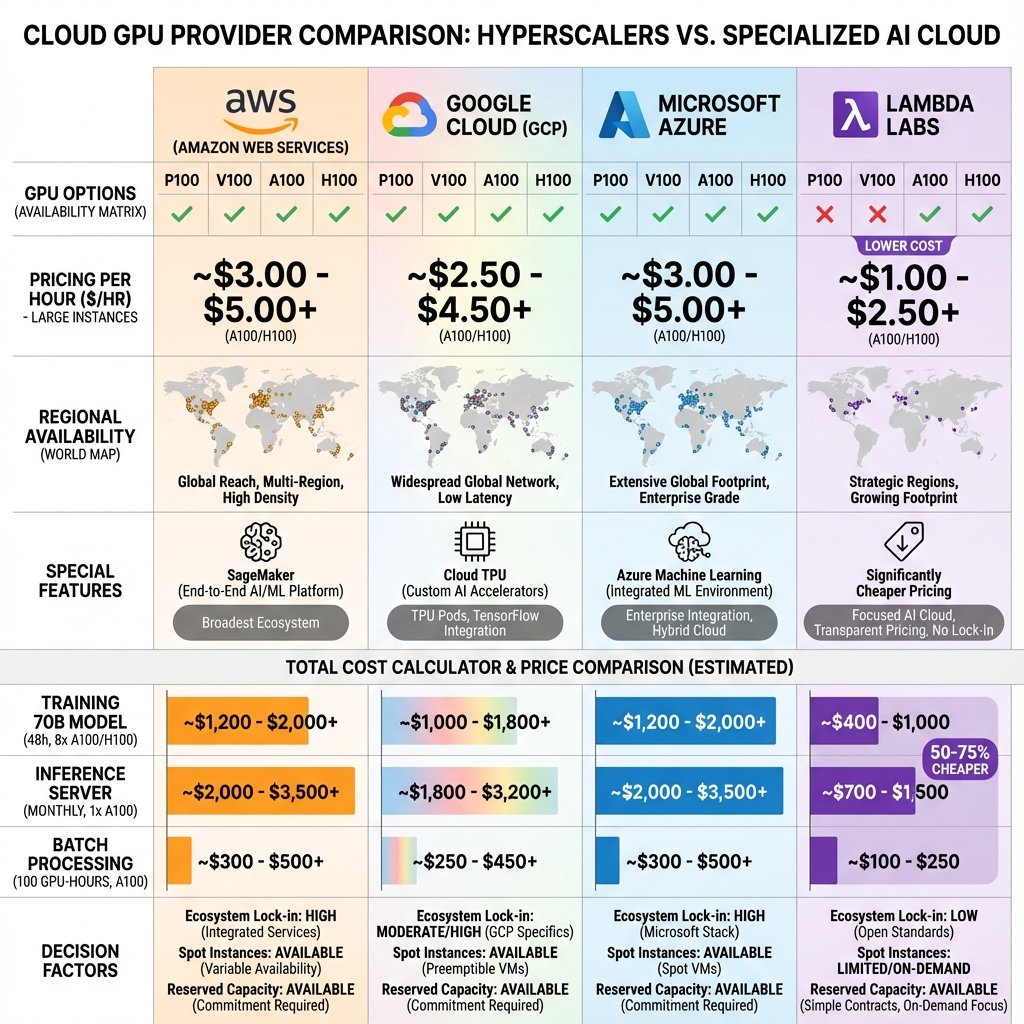
Panorama des providers
Amazon Web Services (AWS)
Leader du marché, écosystème le plus mature.
Instances GPU Training :
| Instance | GPU | VRAM | Prix on-demand | Prix 1-year reserved |
|---|---|---|---|---|
| p3.2xlarge | 1x V100 | 16 GB | 3,06$/h | 1,84$/h (-40%) |
| p3.8xlarge | 4x V100 | 64 GB | 12,24$/h | 7,35$/h |
| p4d.24xlarge | 8x A100 | 320 GB | 32,77$/h | 19,66$/h |
| p5.48xlarge | 8x H100 | 640 GB | 98,32$/h | ~60$/h (estimé) |
Instances GPU Inference :
| Instance | GPU | VRAM | Prix on-demand | Use Case |
|---|---|---|---|---|
| g4dn.xlarge | 1x T4 | 16 GB | 0,526$/h | Inférence légère |
| g5.xlarge | 1x A10G | 24 GB | 1,006$/h | Inférence polyvalente |
| Inf2.xlarge | 1x Inferentia2 | - | 0,76$/h | Inférence optimisée LLM |
Pour des stratégies d’optimisation de l’inférence, consultez notre guide dédié.
Avantages :
- Écosystème mature : SageMaker (ML managed), S3 (storage), EC2
- Régions globales : 30+ régions
- Spot instances : -70% (mais préemptible)
- Marketplace : AMI pré-configurées (NVIDIA, PyTorch, etc.)
Inconvénients :
- Prix élevés : 2-3x plus cher que providers alternatifs
- Complexité : Courbe d’apprentissage
- Data transfer out : 0,09$/GB (coûteux si gros datasets)
Quand utiliser :
- Entreprises avec infrastructure AWS existante
- Besoin intégrations (Lambda, S3, etc.)
- Multi-région requis
- Budget confortable
Google Cloud Platform (GCP)
Seul provider avec TPU, bon pour recherche. Google a développé les TPU spécifiquement pour l’entraînement de modèles IA à grande échelle.
Instances GPU :
| Instance | GPU | VRAM | Prix on-demand | Prix committed |
|---|---|---|---|---|
| n1-standard-4 + 1x T4 | 1x T4 | 16 GB | 0,44$/h | 0,29$/h (-34%) |
| a2-highgpu-1g | 1x A100 | 40 GB | 3,67$/h | 2,57$/h |
| a2-highgpu-8g | 8x A100 | 320 GB | 29,39$/h | 20,57$/h |
| a3-highgpu-8g | 8x H100 | 640 GB | ~80$/h | ~56$/h (estimé) |
TPU (exclusif GCP) :
| TPU | Performance | Prix on-demand | Prix preemptible |
|---|---|---|---|
| TPU v4 (pod slice) | 275 TFLOPS | 4,50$/h/chip | 1,35$/h/chip (-70%) |
| TPU v5e | 197 TFLOPS | 2,10$/h/chip | 0,63$/h/chip |
Avantages :
- TPU : Excellents pour training à grande échelle (alternative NVIDIA)
- Vertex AI : Plateforme ML intégrée
- Networking : 100 Gbps entre VMs (meilleur que AWS)
- Sustained use discounts : Réductions automatiques usage continu
Inconvénients :
- Prix GPU : Similaires ou supérieurs à AWS
- Disponibilité : A100/H100 souvent indisponibles
- TPU learning curve : Nécessite adaptation code (XLA, JAX)
Quand utiliser :
- Recherche avec gros budgets (TPU pour training from scratch)
- Stack Google existant (BigQuery, etc.)
- Besoin networking ultra-rapide
Microsoft Azure
Bien intégré écosystème Microsoft, bon pour entreprises.
Instances GPU :
| Instance | GPU | VRAM | Prix on-demand | Prix 1-year reserved |
|---|---|---|---|---|
| NC6s v3 | 1x V100 | 16 GB | 3,06$/h | 1,84$/h |
| NC24ads A100 v4 | 1x A100 | 80 GB | 3,67$/h | 2,57$/h |
| ND96amsr A100 v4 | 8x A100 | 640 GB | 27,20$/h | ~19$/h |
| ND96isr H100 v5 | 8x H100 | 640 GB | ~85$/h | ~60$/h (estimé) |
Avantages :
- Intégration Microsoft : Azure ML, Power BI, Office 365
- Enterprise features : AD, compliance, support
- Hybrid cloud : Azure Arc (on-prem + cloud)
Inconvénients :
- Prix : Similaires AWS/GCP
- Disponibilité : GPUs haute-gamme limités
- Moins mature : ML tools vs AWS/GCP
Quand utiliser :
- Stack Microsoft (.NET, Windows, Azure AD)
- Entreprises avec contrats Enterprise Agreement
- Hybrid cloud requis
Lambda Labs
Spécialiste GPU IA, meilleur rapport qualité/prix.
Instances GPU (on-demand) :
| Instance | GPU | VRAM | Prix | vs AWS | Disponibilité |
|---|---|---|---|---|---|
| 1x RTX 6000 Ada | 1x RTX 6000 Ada | 48 GB | 0,75$/h | -75% | ⭐⭐⭐⭐ |
| 1x A100 (40GB) | 1x A100 | 40 GB | 1,29$/h | -65% | ⭐⭐⭐ |
| 1x A100 (80GB) | 1x A100 | 80 GB | 1,49$/h | -60% | ⭐⭐ |
| 8x A100 (80GB) | 8x A100 | 640 GB | 11,92$/h | -64% | ⭐ |
| 8x H100 | 8x H100 | 640 GB | 18,40$/h | -81% | ⭐ (rare) |
Champion prix/performance : Lambda Labs offre des tarifs 60-81% moins chers qu’AWS. Un cluster 8x A100 coûte 11,92$/h vs 32,77$/h sur AWS p4d, soit 15 000$/mois d’économie sur usage 24/7.
Reserved instances : Pas de contrat long terme requis (flexible)
Avantages :
- Prix imbattables : 2-4x moins cher que AWS/GCP/Azure
- Simple : Interface minimaliste, SSH direct
- Networking : 100 Gbps inter-instance
- Storage : 512 GB SSD inclus, NVMe rapide
- Pas de data transfer fees : Gratuit
Inconvénients :
- Disponibilité : H100 souvent out of stock
- Pas de managed services : Pas d’équivalent SageMaker
- Support : Communauté uniquement (pas d’enterprise support)
- Régions limitées : USA principalement
Quand utiliser :
- Startups / chercheurs avec budgets limités
- Training / fine-tuning (pas besoin services managed)
- Workloads batch (pas serving critique)
- Recommandé pour 80% des use cases IA
RunPod
GPU cloud communautaire + serverless.
Instances GPU (spot, prix variables) :
| GPU | VRAM | Prix spot (indicatif) | Prix on-demand |
|---|---|---|---|
| RTX 4090 | 24 GB | 0,39$/h | 0,69$/h |
| RTX A6000 | 48 GB | 0,79$/h | 1,19$/h |
| A100 (80GB) | 80 GB | 1,89$/h | 2,89$/h |
| H100 | 80 GB | 3,99$/h | 5,99$/h |
Serverless : Pay-per-second, auto-scaling
- Cold start : ~30s
- Pricing : 0,0002$/s (0,72$/h RTX 4090)
- Min charge : 1s (vs 1h providers classiques)
Avantages :
- Prix compétitifs : Spot très cheap
- Serverless : Pas de gestion infra, auto-scale
- Flexibilité : Pay-per-second
- Templates : Pre-built (PyTorch, TensorFlow, Stable Diffusion)
Inconvénients :
- Fiabilité variable : Hardware communautaire (uptime non garanti)
- Spot préemptible : Peut être interrompu
- Performance variable : Dépend du host
Quand utiliser :
- Expérimentation, prototyping
- Workloads interruptibles
- Serving basse criticité (serverless pratique)
- Budget ultra-serré
Vast.ai
Marketplace GPU peer-to-peer, prix les plus bas.
Instances GPU (prix spot, très variables) :
| GPU | VRAM | Prix min (observé) | Prix typique |
|---|---|---|---|
| RTX 3090 | 24 GB | 0,15$/h | 0,30$/h |
| RTX 4090 | 24 GB | 0,25$/h | 0,50$/h |
| A100 (40GB) | 40 GB | 0,70$/h | 1,20$/h |
| A100 (80GB) | 80 GB | 1,00$/h | 1,80$/h |
Modèle : Particuliers et entreprises louent leurs GPU inutilisés.
Avantages :
- Prix imbattables : 5-10x moins cher que AWS
- Disponibilité : Large inventaire (milliers de GPUs)
- Flexibilité : Louer à la minute
Inconvénients :
- Fiabilité : Hosts peuvent déconnecter sans préavis
- Performance : Variable (networking, CPU, etc.)
- Support : Aucun
- Sécurité : Données sur hardware inconnu
Quand utiliser :
- Expérimentation, learning
- Workloads non-critiques et interruptibles
- Budget très limité (étudiants, hobbyists)
- Non recommandé pour production
Comparatif Prix (2025)
Training (8x A100, 1 mois 24/7)
| Provider | Prix/h | Prix/mois (720h) | vs Lambda |
|---|---|---|---|
| AWS (p4d.24xlarge) | 32,77$/h | 23 594$ | +98% |
| GCP (a2-highgpu-8g) | 29,39$/h | 21 161$ | +77% |
| Azure (ND96) | 27,20$/h | 19 584$ | +64% |
| Lambda Labs | 11,92$/h | 8 582$ | Baseline |
| RunPod (on-demand) | 23,12$/h | 16 646$ | +94% |
| Vast.ai (spot) | ~14,40$/h | 10 368$ | +21% |
Sur 1 an : 180 144$ économisés - de quoi acheter son propre hardware avec un excellent ROI !
Inference (1x L4, 1 mois 24/7)
| Provider | Instance | Prix/h | Prix/mois | Notes |
|---|---|---|---|---|
| AWS | g5.xlarge (A10G) | 1,01$/h | 727$ | - |
| GCP | g2-standard-4 (L4) | 0,72$/h | 518$ | L4 optimal inference |
| Azure | NC4as T4 v3 | 0,53$/h | 382$ | T4 moins performant |
| Lambda | RTX 6000 Ada | 0,75$/h | 540$ | 48GB VRAM |
| RunPod serverless | Variable | ~0,50$/h | 360$ | Pay-per-second |
Recommandation : GCP (L4) ou RunPod serverless pour meilleur rapport.
Experimentation (4h/jour, 22 jours/mois)
Workload : Fine-tuning occasionnel, 1x A100 40GB
| Provider | Prix/h | Heures/mois | Coût mensuel |
|---|---|---|---|
| AWS (p3.2xlarge, V100) | 3,06$/h | 88h | 269$ |
| AWS spot (70% off) | 0,92$/h | 88h | 81$ |
| Lambda Labs (A100) | 1,29$/h | 88h | 114$ |
| Vast.ai (A100, spot) | 1,00$/h | 88h | 88$ |
Recommandation : AWS spot (si tolérant interruptions) ou Lambda Labs.
Optimisation coûts cloud
Spot Instances (-60-90%)
Principe : Capacité excédentaire vendue au rabais, préemptible.
Réductions drastiques : Les spot instances offrent 60-90% de réduction mais peuvent être interrompues à tout moment. Idéales pour training (avec checkpoints fréquents) mais à proscrire pour du serving production.
AWS Spot :
# Lancer instance spot
aws ec2 run-instances \
  --instance-type p3.2xlarge \
  --image-id ami-xxxx \
  --instance-market-options MarketType=spot,SpotOptions={MaxPrice=1.00}

# Prix historiques : 0,50-1,50$/h (vs 3,06$ on-demand)
Recommandations :
- Training : OK (checkpoint réguliers)
- Serving : Non (interruptions inacceptables)
- Batch jobs : Idéal
- Savings : 60-90%
Gestion interruptions :
# Checkpoint réguliers
if step % 100 == 0:
    torch.save(model.state_dict(), f'ckpt_step{step}.pt')

# Détection préemption (AWS)
# (Vérifier metadata endpoint 2min avant shutdown)
Reserved Instances (-30-60%)
Principe : Engagement 1-3 ans, prix réduits.
AWS Reserved Instances :
- 1 an, no upfront : -30%
- 1 an, all upfront : -40%
- 3 ans, all upfront : -60%
Exemple :
- p4d.24xlarge on-demand : 32,77$/h
- Reserved 1 an : 19,66$/h (-40%)
- Savings : 13,11$/h × 720h/mois = 9 439$/mois
Quand utiliser :
- Workload stable, prévisible
- Projet > 1 an confirmé
- Budget CapEx disponible (upfront)
Savings Plans (Flexible)
Principe : Engagement montant $/h, applicable à différentes instances.
AWS Compute Savings Plans :
- Engagement : 10$/h sur 1-3 ans
- Application : EC2, Fargate, Lambda
- Flexibilité : Changer instance types
- Réduction : jusqu’à -72%
Exemple :
- Engagement : 10$/h × 720h = 7 200$/mois
- Si usage variable (p3 puis g5 puis p4) → Savings applies
- vs On-demand total 12 000$/mois → Économie : 4 800$/mois
Arrêt automatique (Stop Idle Instances)
Coût instances idle : Gaspillage majeur !
Script arrêt auto :
#!/bin/bash
# Arrêter instance si GPU idle > 30min

THRESHOLD=10  # GPU utilization < 10%
DURATION=1800  # 30 minutes

gpu_util=$(nvidia-smi --query-gpu=utilization.gpu --format=csv,noheader,nounits)

if [ "$gpu_util" -lt "$THRESHOLD" ]; then
  sleep $DURATION
  gpu_util=$(nvidia-smi --query-gpu=utilization.gpu --format=csv,noheader,nounits)

  if [ "$gpu_util" -lt "$THRESHOLD" ]; then
    echo "GPU idle, shutting down..."
    sudo shutdown -h now
  fi
fi
Cron job :
# Vérifier toutes les 10 minutes
*/10 * * * * /home/user/check_idle.sh
Économies : 50-70% si workload intermittent.
Providers alternatifs
Stratégie : Dev/test sur providers cheap, prod sur AWS/GCP.
Exemple :
- Expérimentation : Vast.ai (0,50$/h)
- Training finale : Lambda Labs (1,29$/h)
- Serving prod : AWS (SageMaker, HA)
Savings : 60-80% sur phase R&D (majoritaire en temps).
Stratégies multi-cloud
Éviter le Lock-In
Risques lock-in :
- Dépendance services propriétaires (SageMaker, Vertex AI)
- Coûts migration (data transfer, reconfiguration)
- Perte de pouvoir négociation
Solutions :
- Conteneurs : Docker/Kubernetes (portables)
- IaC : Terraform (multi-cloud)
- Data : S3-compatible storage (MinIO, etc.)
- Code : PyTorch/TensorFlow natifs (pas frameworks propriétaires)
Architecture hybridre multi-cloud
Exemple :
- Dev/Test : Lambda Labs (cheap)
- Training : GCP TPU (si gros modèles) ou Lambda (sinon)
- Serving : AWS (reliability) + Cloudflare (CDN)
- Storage : S3 (primaire) + GCS (backup)
Avantages :
- Optimisation coûts (bon provider par workload)
- Résilience (pas de single point of failure)
- Négociation (concurrence providers)
Inconvénients :
- Complexité opérationnelle
- Networking inter-cloud (latence, coûts)
Kubernetes multi-cloud
EKS (AWS) + GKE (GCP) + AKS (Azure) avec Rancher ou Anthos.
Bénéfices :
- Déploiement identique tous clouds
- Failover automatique
- Load balancing inter-cloud
Setup :
# kubeconfig
contexts:
  - name: aws-cluster
    cluster: eks-us-east-1
  - name: gcp-cluster
    cluster: gke-us-central1
  - name: lambda-cluster
    cluster: lambda-gpu-cluster

# Deploy sur tous
kubectl config use-context aws-cluster && kubectl apply -f deployment.yaml
kubectl config use-context gcp-cluster && kubectl apply -f deployment.yaml
Recommandations par use case
| Use Case | Provider Recommandé | Alternative | Raison |
|---|---|---|---|
| Startup MVP | Lambda Labs | Vast.ai | Prix, simplicité |
| Recherche académique | GCP (TPU) | Lambda Labs | TPU pour expériences, Lambda pour budget |
| Entreprise production | AWS | Azure | Écosystème, support, déploiement sécurisé |
| Fine-tuning occasionnel | AWS Spot | RunPod | Interruptible OK, très cheap |
| Serving critique | AWS + CloudFlare | GCP | Reliability, CDN, inférence optimisée |
| Expérimentation | Vast.ai | RunPod | Prix minimal |
| Training continu 24/7 | Lambda Labs | GCP committed | Break-even vs on-prem |
Conclusion
Le cloud GPU offre flexibilité et puissance, mais les coûts peuvent exploser sans optimisation. Lambda Labs émerge comme champion rapport qualité/prix pour la majorité des workloads IA.
Points clés :
- Prix : Lambda Labs = 50-75% moins cher qu’AWS/GCP/Azure
- Spot instances : -70% (training batch OK, serving non)
- Reserved : -40% si engagement 1 an+
- Alternatives : Vast.ai, RunPod pour budgets serrés
- Multi-cloud : Éviter lock-in, optimiser coûts
Règle d’or : Cloud pour démarrage et expérimentation, hardware propre si usage > 200h/mois (break-even 6-18 mois).
Pour aller plus loin :
- Calculez votre ROI cloud vs on-premise
- Comparez les différents GPU disponibles
- Optimisez votre inférence en production
- Découvrez les stratégies de déploiement production
- Explorez le futur du hardware IA (2025-2030)