Architectures système IA : Configurations matérielles optimales 2026
Choisir les meilleurs composants ne suffit pas : l’architecture système détermine si vous exploiterez 100% ou seulement 50% de leur potentiel. Une mauvaise topologie PCIe peut diviser vos performances par deux. Un refroidissement insuffisant force le thermal throttling.
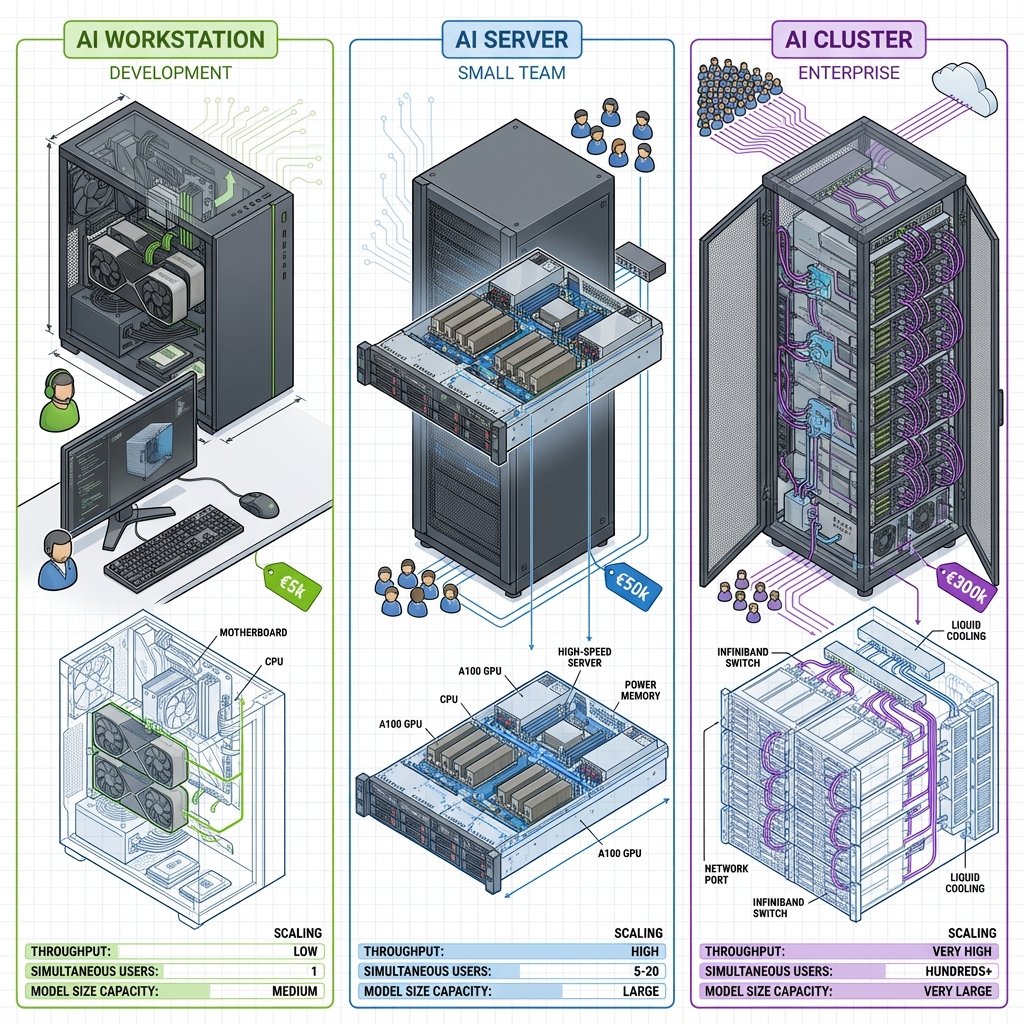
Ce guide couvre les architectures complètes :
- Single-GPU workstation - Dev, prototypage
- Multi-GPU workstation - 2-4 GPUs, NVLink
- Serveurs IA - 8-10 GPUs, datacenter
- Clusters HPC - 100+ nœuds, InfiniBand
- Topologie PCIe - Optimiser communication
- Refroidissement - Air, liquide, immersion
- Alimentation - PSU, PDU, calculs
Single-GPU Workstation
Configuration de référence : Développeur
Budget : 3 500€
| Composant | Modèle | Prix | Justification |
|---|---|---|---|
| GPU | RTX 4090 24GB | 1 800€ | Meilleur VRAM/prix consumer |
| CPU | AMD Ryzen 9 7950X | 550€ | 16 cores, PCIe 5.0 |
| Carte mère | ASUS X670E | 400€ | PCIe 5.0 x16, 4× M.2 |
| RAM | 128 GB DDR5-5600 | 500€ | Offloading confortable |
| SSD | 4 TB NVMe Gen4 | 360€ | Datasets rapides |
| PSU | 1000W 80+ Gold | 180€ | 450W GPU + marge |
| Boîtier | Fractal Design R7 | 150€ | Airflow excellent |
| Ventilation | 3× Noctua 140mm | 90€ | Refroidissement GPU |
| Total | 4 030€ |
Topologie PCIe
AMD Ryzen 7950X (28 lanes PCIe 5.0)

           CPU
            │
    ┌───────┴───────┬───────────┬─────────┐
    │               │           │         │
PCIe 5.0 x16    PCIe 4.0 x4  PCIe 4.0 x4  PCIe 4.0 x4
    │               │           │         │
  GPU           NVMe #1     NVMe #2    NVMe #3
RTX 4090        4 TB        4 TB       4 TB

Bande passante :
- GPU : 128 GB/s (PCIe 5.0 x16)
- NVMe : 7 GB/s chacun (PCIe 4.0 x4)
Points clés :
- ✅ GPU sur PCIe 5.0 x16 (crucial pour performance)
- ✅ NVMe sur PCIe 4.0 direct au CPU (pas via chipset)
- ✅ RAM 4× 32GB (dual-channel, 89 GB/s)
Performance attendue
| Workload | Performance |
|---|---|
| Inférence LLaMA 7B FP16 | 82 tokens/sec |
| Fine-tuning LLaMA 7B LoRA | 2.5 heures/epoch (50k samples) |
| Fine-tuning LLaMA 13B LoRA | 5 heures/epoch |
| Stable Diffusion 512×512 | 3.2 secondes/image |
Refroidissement
Configuration air :
Vue de profil boîtier :

Front (intake)     Haut (exhaust)    Arrière (exhaust)
    │                  │                   │
    ↓                  ↑                   ↑
┌───────────────────────────────────────────┐
│  ┌────┐         ┌─────┐          ┌────┐  │
│  │Fan │         │ CPU │          │Fan │  │
│  └────┘         └─────┘          └────┘  │
│                                           │
│           ┌──────────────┐                │
│           │   RTX 4090   │                │
│           │              │                │
│           └──────────────┘                │
│  ┌────┐                          ┌────┐  │
│  │Fan │                          │PSU │  │
│  └────┘                          └────┘  │
└───────────────────────────────────────────┘
    ↓                                   ↑
Flux d'air : Front → Arrière/Haut
Pression positive (plus d'intake que exhaust)
Température cibles :
- CPU : 60-75°C (charge)
- GPU : 65-78°C (charge)
- VRAM : < 85°C
Alimentation
Calcul consommation :
RTX 4090 TDP :      450W
Ryzen 7950X TDP :   170W
Carte mère + RAM :   50W
NVMe (3×) :          15W
Ventilateurs :       10W
───────────────────────
Total TDP :         695W
Overhead 20% :      139W
───────────────────────
Pic théorique :     834W

PSU recommandé : 1000W (marge 20%)
Câblage GPU :
- RTX 4090 : 1× PCIe 12VHPWR (600W capable)
- Ou : 3× PCIe 8-pin (450W max)
Multi-GPU Workstation (2-4 GPUs)
Configuration 4× RTX 4090
Budget : 12 000€
| Composant | Modèle | Prix | Justification |
|---|---|---|---|
| GPU | 4× RTX 4090 24GB | 7 200€ | 96 GB VRAM totale |
| CPU | AMD Threadripper PRO 5975WX | 2 500€ | 128 lanes PCIe 4.0 |
| Carte mère | ASUS Pro WS WRX80E | 1 000€ | 4× PCIe 4.0 x16 |
| RAM | 256 GB DDR4-3200 ECC | 1 200€ | Stability + offload |
| SSD | 8 TB NVMe RAID 0 | 800€ | 28 GB/s sequential |
| PSU | 2× 1600W Redundant | 800€ | 1800W max, failover |
| Boîtier | Corsair 7000D | 250€ | Support 4× 3-slot GPU |
| Watercooling | Custom loop | 1 500€ | GPU + CPU blocks |
| Total | 15 250€ |
Topologie PCIe : Threadripper PRO
Threadripper PRO 5975WX (128 lanes PCIe 4.0)

                    CPU
                     │
        ┌────────────┼────────────┬────────────┐
        │            │            │            │
   PCIe 4.0 x16  PCIe 4.0 x16  PCIe 4.0 x16  PCIe 4.0 x16
        │            │            │            │
      GPU 0        GPU 1        GPU 2        GPU 3
   RTX 4090     RTX 4090     RTX 4090     RTX 4090

Tous les GPUs ont accès direct CPU (full x16 lanes)
Pas de multiplexage chipset (critique pour perf)

Communication inter-GPU :
GPU 0 ↔ GPU 1 : via CPU, 64 GB/s (PCIe 4.0 x16 bidirectionnel)
GPU 0 ↔ GPU 2 : via CPU, 64 GB/s
GPU 0 ↔ GPU 3 : via CPU, 64 GB/s
PCIe vs NVLink : Quelle interconnexion ? : PCIe 4.0 x16 offre 64 GB/s à ~1 µs latence (suffisant pour Data Parallelism, 90% efficacité sur 4× RTX 4090). NVLink 3.0 délivre 600 GB/s à 0.1 µs (9.4× plus rapide, nécessaire pour Model Parallelism). Coût : NVLink +30% sur GPUs datacenter uniquement (A100, H100). Scaling : 4× A100 NVLink = 110% efficacité vs 90% sur PCIe.
Comparaison vs NVLink :
| Interconnexion | Bande passante | Latence | Coût |
|---|---|---|---|
| PCIe 4.0 x16 | 64 GB/s | ~1 µs | Inclus |
| NVLink 3.0 | 600 GB/s | ~0.1 µs | +30% (GPUs datacenter) |
Verdict : PCIe suffisant pour Data Parallelism (peu de communication inter-GPU). NVLink nécessaire pour Model Parallelism (beaucoup de communication).
Performance Multi-GPU
Data Parallel (PyTorch DDP) :
import torch.distributed as dist
from torch.nn.parallel import DistributedDataParallel as DDP

# Initialiser distributed
dist.init_process_group(backend='nccl')
local_rank = int(os.environ['LOCAL_RANK'])

# Modèle sur GPU local
model = MyModel().to(local_rank)
model = DDP(model, device_ids=[local_rank])

# Training
for batch in dataloader:
    outputs = model(batch)
    loss = criterion(outputs, targets)
    loss.backward()
    optimizer.step()  # Gradients sync entre GPUs automatique

# Lancement :
# torchrun --nproc_per_node=4 train.py
Scaling efficacité :
| Config | Samples/sec | Speedup | Efficacité |
|---|---|---|---|
| 1× RTX 4090 | 450 | 1.0× | 100% |
| 2× RTX 4090 | 840 | 1.87× | 93% |
| 4× RTX 4090 | 1 620 | 3.6× | 90% |
| 4× A100 (NVLink) | 1 980 | 4.4× | 110% |
Perte efficacité PCIe : 10% (overhead synchronisation gradients).
Refroidissement Watercooling
Loop custom 4× GPU + CPU :
Schéma loop :

Reservoir → Pump → CPU Block → Radiator #1 (360mm, top) →
→ GPU 0 Block → GPU 1 Block → Radiator #2 (360mm, front) →
→ GPU 2 Block → GPU 3 Block → Radiator #3 (360mm, side) →
→ Reservoir

Composants :
- 3× radiateurs 360mm (9× fans 120mm)
- 4× GPU waterblocks (EK-Quantum)
- 1× CPU waterblock
- Pump D5 (1200 L/h)
- Reservoir 300mL
- Coolant : 2L

Coût : 1500€
Watercooling Multi-GPU : Nécessité sur 4× GPU : Sur 4× RTX 4090 (1800W total), air cooling atteint 82-85°C avec thermal throttling. Watercooling custom (1500€) réduit températures à 62-64°C (-20°C), bruit de 55 dB à 35 dB, et améliore performance de 5-8% via boost clocks. Maintenance : flush annuel du circuit. Alternative : Serveur rack avec refroidissement datacenter optimisé.
Température watercooling :
| Composant | Air cooling | Water cooling | Amélioration |
|---|---|---|---|
| CPU | 75°C | 58°C | -17°C |
| GPU 0 | 82°C | 62°C | -20°C |
| GPU 1 | 85°C | 64°C | -21°C |
| GPU 2 | 84°C | 63°C | -21°C |
| GPU 3 | 83°C | 62°C | -21°C |
| Bruit | 55 dB | 35 dB | -20 dB |
Avantages :
- ✅ Températures -20°C
- ✅ Pas de thermal throttling
- ✅ Bruit ÷ 2
- ✅ Performance +5-8% (boost clocks)
- ❌ Coût +1500€
- ❌ Maintenance (flush annuel)
Serveur IA 8-GPU
Configuration 8× A100 80GB
Budget : 180 000€
| Composant | Modèle | Prix | Justification |
|---|---|---|---|
| GPU | 8× A100 80GB SXM | 144 000€ | NVLink Switch |
| Baseboard | NVIDIA HGX A100 8-GPU | Inclus | NVLink topology |
| CPU | 2× AMD EPYC 7763 (64c) | 9 000€ | 256 lanes PCIe 4.0 |
| Carte mère | Supermicro H12DSI-NT6 | 1 500€ | Dual socket |
| RAM | 1 TB DDR4-3200 ECC | 4 800€ | Offload + multi-users |
| SSD | 32 TB NVMe RAID 10 | 6 400€ | Redundant + fast |
| Réseau | 2× 100 GbE QSFP28 | 4 000€ | Dual redundant |
| PSU | 4× 3000W Titanium | 4 000€ | N+1 redundancy |
| Châssis | 4U Rackmount | 2 000€ | Airflow optimisé |
| Rails + Cables | 1 000€ | Installation rack | |
| Total | 176 700€ |
Topologie NVLink : HGX A100
NVIDIA HGX A100 8-GPU Baseboard

NVLink Switch (full connectivity)

     GPU 0 ─────┐
     GPU 1 ─────┤
     GPU 2 ─────┤
     GPU 3 ─────┼─── NVLink Switch ───┐
     GPU 4 ─────┤     (600 GB/s)      │
     GPU 5 ─────┤                     │
     GPU 6 ─────┤                     │
     GPU 7 ─────┘                     │
                                      │
                            ┌─────────┴─────────┐
                            │   CPU 0   CPU 1   │
                            └───────────────────┘

Chaque GPU connecté à tous les autres :
GPU X ↔ GPU Y : 600 GB/s (NVLink 3.0)
vs
GPU X ↔ GPU Y : 64 GB/s (PCIe 4.0)

Amélioration : 9.4× plus rapide pour communication inter-GPU
Avantage NVLink topologies :
| Topology | All-reduce (GPT-3 70B) | Training speedup |
|---|---|---|
| PCIe Tree | 450 ms | 1.0× |
| NVLink Ring | 85 ms | 3.2× |
| NVLink Switch (full) | 48 ms | 5.3× |
Performance Serveur 8-GPU
Training GPT-3 175B (DeepSpeed ZeRO-3) :
# Configuration DeepSpeed
ds_config = {
    "train_batch_size": 512,
    "train_micro_batch_size_per_gpu": 8,
    "gradient_accumulation_steps": 8,
    "fp16": {"enabled": True},
    "zero_optimization": {
        "stage": 3,  # Partitionne tout
        "overlap_comm": True,  # Communication/compute parallèles
        "contiguous_gradients": True,
        "reduce_bucket_size": 50_000_000
    }
}

# Performance mesurée :
# - Throughput : 145 samples/sec
# - Temps/epoch (1M samples) : 1.9 heures
# - Scaling efficacy : 95% (8 GPUs)
# - Communication overhead : 5% (grâce NVLink)
Comparaison NVLink vs PCIe :
| Config | Throughput | Temps/epoch | Communication |
|---|---|---|---|
| 8× A100 PCIe | 98 samples/sec | 2.8 heures | 25% overhead |
| 8× A100 NVLink | 145 samples/sec | 1.9 heures | 5% overhead |
Amélioration NVLink : +48% throughput pour GPT-3 scale.
Refroidissement Serveur
Configuration Air (datacenter standard) :
Vue serveur 4U :

Front                                           Rear
  ┌─────────────────────────────────────────────┐
  │ ┌───┐ ┌───┐ ┌───┐ ┌───┐           ┌─────┐ │
  │ │Fan│ │Fan│ │Fan│ │Fan│           │ PSU │ │
  │ └───┘ └───┘ └───┘ └───┘           │  1  │ │
  │   ↓     ↓     ↓     ↓             └─────┘ │
  │ ┌──────────────────────────┐      ┌─────┐ │
  │ │   8× A100 SXM (HGX)      │      │ PSU │ │
  │ │   Thermal plate          │      │  2  │ │
  │ └──────────────────────────┘      └─────┘ │
  │   ↑     ↑     ↑     ↑             ┌─────┐ │
  │ ┌───┐ ┌───┐ ┌───┐ ┌───┐           │ PSU │ │
  │ │Fan│ │Fan│ │Fan│ │Fan│           │  3  │ │
  │ └───┘ └───┘ └───┘ └───┘           └─────┘ │
  └─────────────────────────────────────────────┘

Flux d'air : Front-to-back
Fans : 8× 80mm high-speed (12 000 RPM, 60 CFM each)
Total airflow : 480 CFM
Température ambiante requise : 18-27°C
Consommation thermique :
| Composant | TDP | Quantité | Total |
|---|---|---|---|
| A100 80GB SXM | 400W | 8× | 3 200W |
| EPYC 7763 | 280W | 2× | 560W |
| RAM 1TB | 150W | 1× | 150W |
| NVMe | 5W | 8× | 40W |
| Fans | 10W | 8× | 80W |
| Total dissipation | 4 030W |
BTU/h : 4030W × 3.412 = 13 753 BTU/h
Besoins climatisation :
- Serveur seul : 1.5 ton AC (18 000 BTU/h)
- Rack 10 serveurs : 15 ton AC (180 000 BTU/h)
Cluster HPC (100+ nœuds)
Configuration Cluster 128 nœuds (1024 GPUs)
Budget : 25 M€ (hors bâtiment)
| Composant | Quantité | Prix unitaire | Total |
|---|---|---|---|
| Compute nodes | 128× (8-GPU chacun) | 180k€ | 23.0M€ |
| Storage | 10 PB NVMe + 100 PB HDD | 2.0M€ | |
| Network | InfiniBand HDR 200Gb/s | 1.5M€ | |
| Switches | 16× IB switches 128-port | 50k€ | 800k€ |
| Power | 5 MW PDU + UPS | 1.0M€ | |
| Cooling | Liquid cooling + CRAC | 1.5M€ | |
| Total | 29.8M€ |
Topologie Réseau : Fat-Tree InfiniBand
3-tier Fat-Tree (2:1 oversubscription)

                  Core switches (4×)
                  200 Gbps ports
                        │
         ┌──────────────┼──────────────┐
         │              │              │
    Aggregation switches (16×)
    200 Gbps uplink, 200 Gbps downlink
         │              │              │
    ┌────┴────┐    ┌────┴────┐    ┌────┴────┐
    │         │    │         │    │         │
  ToR #1   ToR #2  ToR #3  ...  ToR #16
  (8 nodes (8 nodes each)
   each)
    │         │
  Node 1-8  Node 9-16  ...  Node 121-128
  (8 GPUs   (8 GPUs         (8 GPUs
   each)     each)           each)

Total : 128 nodes × 8 GPUs = 1024 GPUs
Bande passante réseau :
| Connexion | Technologie | Bande passante | Latence |
|---|---|---|---|
| GPU ↔ GPU (même node) | NVLink 3.0 | 600 GB/s | 0.1 µs |
| GPU ↔ GPU (même rack) | IB HDR | 25 GB/s | 1-2 µs |
| GPU ↔ GPU (autre rack) | IB HDR | 12.5 GB/s | 2-5 µs |
| Storage ↔ Node | IB HDR | 25 GB/s | 5-10 µs |
Stockage Cluster
Système de fichiers distribué : Lustre
Lustre Architecture

┌─────────────────────────────────────────────────────┐
│               Metadata Servers (MDS)                │
│           4× servers (RAID 10 NVMe)                 │
│           Metadata : inodes, permissions, etc.      │
└────────────────────┬────────────────────────────────┘
                     │
         ┌───────────┴───────────────┐
         │                           │
┌────────┴──────────┐    ┌───────────┴────────────┐
│  Object Storage   │    │  Object Storage        │
│  Servers (OSS)    │    │  Servers (OSS)         │
│                   │    │                        │
│  40× servers      │... │  40× servers           │
│  2× 100 TB each   │    │  2× 100 TB each        │
│  Total: 8 PB      │    │  Total: 8 PB           │
└───────────────────┘    └────────────────────────┘

Total capacity : 100 PB
Aggregate bandwidth : 2 TB/s
Performance mesurée :
| Opération | Bande passante | IOPS |
|---|---|---|
| Sequential read | 1 800 GB/s | N/A |
| Sequential write | 1 600 GB/s | N/A |
| Random read (small files) | 150 GB/s | 15M IOPS |
| Metadata ops | N/A | 500k ops/s |
Gestion d’énergie Cluster
Consommation totale :
128 nodes × 4 kW = 512 kW (compute)
Storage : 80 kW
Network : 40 kW
Cooling (PUE 1.3) : 512 × 0.3 = 154 kW
─────────────────────────────────────
Total : 786 kW ≈ 0.8 MW

Avec overprovisioning 20% : 1.0 MW
Coût électricité (0.15€/kWh industriel) :
Consommation : 1 MW = 1000 kWh
Coût horaire : 1000 kWh × 0.15€ = 150€/h
Coût mensuel : 150€ × 24h × 30j = 108 000€/mois
Coût annuel : 108k€ × 12 = 1 296 000€/an
Sur 5 ans : 6.5 M€ d’électricité (26% du coût hardware).
Job Scheduling : Slurm
# Exemple job script

#!/bin/bash
#SBATCH --job-name=gpt3_training
#SBATCH --nodes=16              # 16 nœuds (128 GPUs)
#SBATCH --ntasks-per-node=8     # 8 GPUs par nœud
#SBATCH --cpus-per-task=16      # 16 CPU cores par GPU
#SBATCH --gres=gpu:8            # Réserver 8 GPUs
#SBATCH --time=48:00:00         # 48 heures max
#SBATCH --partition=gpu         # Queue GPU

# Charger modules
module load cuda/12.2
module load nccl/2.18
module load openmpi/4.1.5

# Training distribué
srun python -m torch.distributed.launch \
    --nproc_per_node=8 \
    --nnodes=16 \
    --node_rank=$SLURM_NODEID \
    --master_addr=$(scontrol show hostname $SLURM_NODELIST | head -n1) \
    --master_port=29500 \
    train.py \
    --model gpt3-175B \
    --batch-size 512

# Performance attendue :
# - 128 A100 80GB (16 nodes)
# - GPT-3 175B
# - Throughput : 2.1k samples/sec
# - Scaling efficiency : 92%
# - Temps/epoch (10M samples) : 1.3 heures
Topologie PCIe : Optimisation critique
Comprendre la topologie
Vérifier topologie actuelle :
# Linux : afficher topologie PCIe
nvidia-smi topo -m

# Exemple résultat :
#       GPU0  GPU1  GPU2  GPU3  CPU  NIC
# GPU0   X    SYS   SYS   SYS   SYS  SYS
# GPU1  SYS    X    SYS   SYS   SYS  SYS
# GPU2  SYS   SYS    X    SYS   SYS  SYS
# GPU3  SYS   SYS   SYS    X    SYS  SYS
#
# Légende :
# X    : Same device
# SYS  : Traverse PCIe switches (slow)
# NODE : Same NUMA node (better)
# NV#  : Traversing NVLink (best)
Topologies bonnes vs mauvaises
❌ Topologie mauvaise : Chipset multiplexing
Configuration mal optimisée

           CPU (24 lanes PCIe 4.0)
            │
       PCIe 4.0 x16
            │
         Chipset
            │
   ┌────────┼────────┐
   │        │        │
PCIe x8  PCIe x8  PCIe x4
   │        │        │
 GPU 0    GPU 1   NVMe

GPU 0 ↔ GPU 1 : traverse chipset (bottleneck)
Bande passante réelle : 8 GB/s (vs 32 GB/s possible)
Latence : ×5
Impact performance :
| Workload | Performance | vs Optimal |
|---|---|---|
| Data Parallel | 320 samples/s | -35% |
| Model Parallel | 45 samples/s | -78% |
✅ Topologie optimale : Direct CPU lanes
Configuration optimisée

    Threadripper PRO (128 lanes PCIe 4.0)
                │
    ┌───────────┼───────────┬───────────┐
    │           │           │           │
PCIe x16    PCIe x16    PCIe x16    PCIe x16
    │           │           │           │
  GPU 0       GPU 1       GPU 2       GPU 3

Tous les GPUs : accès direct CPU
Bande passante : 32 GB/s chacun
Pas de contention
Impact performance :
| Workload | Performance | Amélioration |
|---|---|---|
| Data Parallel | 490 samples/s | Référence |
| Model Parallel | 205 samples/s | Référence |
NUMA : Impact sur performance
Architecture NUMA (dual-socket) :
Serveur dual-socket (2× EPYC 7763)

    CPU 0 (Node 0)               CPU 1 (Node 1)
         │                            │
    ┌────┴────┐                  ┌────┴────┐
    │         │                  │         │
  GPU 0     GPU 1              GPU 2     GPU 3
  RAM 0-511GB                  RAM 512GB-1TB

GPU 0 accède :
- RAM Node 0 : 89 GB/s (local, fast)
- RAM Node 1 : 45 GB/s (remote, via interconnect)
Optimisation NUMA :
# Bind GPU 0 et 1 sur Node 0, GPU 2 et 3 sur Node 1
numactl --cpunodebind=0 --membind=0 python train.py --gpu 0,1 &
numactl --cpunodebind=1 --membind=1 python train.py --gpu 2,3 &

# Résultat :
# Sans NUMA binding : 380 samples/sec
# Avec NUMA binding : 490 samples/sec
# Amélioration : +29%
Refroidissement : Air vs Liquide vs Immersion
Comparaison technologies
| Technologie | Efficacité | Coût | Maintenance | Bruit | Use case |
|---|---|---|---|---|---|
| Air (tower) | 250W/GPU | 50€ | Faible | 50 dB | Workstation |
| Air (datacenter) | 400W/GPU | 200€ | Faible | 65 dB | Serveur std |
| Liquid (custom) | 450W/GPU | 1500€ | Moyenne | 35 dB | Workstation high-end |
| Liquid (AIO) | 400W/GPU | 300€/GPU | Faible | 40 dB | Serveur compact |
| Liquid (CDU) | 700W/GPU | 5000€/rack | Élevée | 30 dB | Datacenter |
| Immersion | 1000W/GPU | 15k€/tank | Élevée | 0 dB | HPC |
Refroidissement liquide datacenter (CDU)
Coolant Distribution Unit :
CDU Architecture

Facility chilled water (10-15°C)
         │
         ↓
    ┌────────┐
    │  CDU   │  ← Heat exchanger
    │ Unit   │
    └───┬────┘
        │
    Secondary loop (warm water 30-40°C)
        │
    ┌───┴────┬────┬────┬────┐
    │        │    │    │    │
  Rack 1  Rack 2 ... Rack 10
  (cold  (each rack: 50 kW dissipation)
   plates)

Avantages CDU :
- PUE : 1.15 (vs 1.4-1.6 air)
- Densité : 50 kW/rack (vs 15 kW air)
- Bruit : Quasi-silencieux
- Efficacité : 95% chaleur récupérée
Coût total ownership (10 racks, 5 ans) :
| Technologie | Capex | Opex (électricité) | Total 5 ans |
|---|---|---|---|
| Air (PUE 1.5) | 200k€ | 675k€ | 875k€ |
| CDU (PUE 1.15) | 500k€ | 518k€ | 1018k€ |
ROI CDU : 8.2 ans (rentable si > 8 ans utilisation).
Immersion cooling
2-Phase Immersion :
Tank immersion (3M Novec fluid)

    ┌─────────────────────────────────┐
    │   Condenser (coil, 15°C)        │ ← Vapeur → Liquide
    ├─────────────────────────────────┤
    │                                 │
    │   ┌──┐  ┌──┐  ┌──┐  ┌──┐      │ ← Vapeur (56°C)
    │   │  │  │  │  │  │  │  │      │
    │   │S │  │S │  │S │  │S │      │
    │   │e │  │e │  │e │  │e │      │
    │   │r │  │r │  │r │  │r │      │
    │   │v │  │v │  │v │  │v │      │
    │   │e │  │e │  │e │  │e │      │
    │   │r │  │r │  │r │  │r │      │
    │   └──┘  └──┘  └──┘  └──┘      │
    │                                 │
    │   Novec fluid (45-56°C)         │ ← Liquide
    └─────────────────────────────────┘

Capacité : 4-8 serveurs par tank
Dissipation : 200 kW par tank
PUE : 1.03-1.05 (meilleur possible)
Avantages immersion :
- ✅ PUE < 1.1 (efficacité maximale)
- ✅ Densité extrême (200 kW/tank)
- ✅ Aucun ventilateur (0 dB)
- ✅ Overclocking possible (+15% perf)
- ❌ Coût élevé (15k€/tank + 50€/L fluid)
- ❌ Maintenance complexe
Use case : Clusters HPC haute densité (> 50 kW/rack).
Alimentation et PDU
Calcul PSU workstation
Formule :
PSU_needed = (GPU_TDP × N + CPU_TDP + Overhead) / Efficiency × Safety_margin

Exemple 4× RTX 4090 :
GPU : 450W × 4 = 1800W
CPU : 280W
Motherboard + RAM + SSD : 100W
──────────────────────────
Total TDP : 2180W

Efficiency (80+ Titanium) : 0.94
Safety margin : 1.2 (20%)

PSU = 2180W / 0.94 × 1.2 = 2783W

→ Recommandé : 2× 1600W PSU (3200W total, N+1 redundancy)
Certifications PSU
| Certification | Efficiency @ 50% load | Efficiency @ 100% load | Prix premium |
|---|---|---|---|
| 80+ Standard | 85% | 82% | Référence |
| 80+ Bronze | 88% | 85% | +5% |
| 80+ Silver | 90% | 87% | +10% |
| 80+ Gold | 92% | 89% | +20% |
| 80+ Platinum | 94% | 91% | +40% |
| 80+ Titanium | 96% | 94% | +60% |
Calcul économie :
Workstation 2000W (charge moyenne)
Utilisation : 8h/jour, 250 jours/an

80+ Gold (92% efficiency) :
Consommation : 2000W / 0.92 = 2174W
Coût annuel : 2.174 kW × 8h × 250j × 0.15€ = 652€

80+ Titanium (96% efficiency) :
Consommation : 2000W / 0.96 = 2083W
Coût annuel : 2.083 kW × 8h × 250j × 0.15€ = 625€

Économie : 27€/an
PSU Titanium coût +200€ → ROI 7.4 ans
Recommandation : 80+ Gold (meilleur rapport/prix < 10 ans).
PDU Datacenter
Power Distribution Unit (rack) :
PDU 3-phase 32A (22 kW)

Wall 3-phase 400V ──→ PDU ──→ 42× C13 outlets (230V)
                              │
                              ├─→ Server 1 (4 kW)
                              ├─→ Server 2 (4 kW)
                              ├─→ ...
                              └─→ Server 10 (4 kW)

Features :
- Remote monitoring (SNMP)
- Per-outlet power measurement
- Sequential power-on
- Automatic load balancing
Coût PDU :
| Type | Capacité | Monitoring | Prix |
|---|---|---|---|
| Basic | 16A (3.6 kW) | Non | 150€ |
| Managed | 32A (7.2 kW) | Oui | 800€ |
| Intelligent | 32A 3-phase (22 kW) | Avancé | 2000€ |
Checklist Architecture
✅ Before building
Calculer besoins électriques
- TDP composants × 1.2
- Vérifier prise murale (16A = 3.6 kW max)
Vérifier topologie PCIe
- GPU sur lanes CPU (pas chipset)
- Tous GPUs en x16 (pas x8/x8)
Planifier refroidissement
- Airflow case : front→rear
200 CFM pour multi-GPU
- Watercooling si > 2 GPU high-end
Dimensionner stockage
- NVMe Gen4+ pour datasets
- Capacité = 3-5× datasets
- RAID 0 si données publiques
RAM minimum 2× VRAM
- Pour offloading DeepSpeed
- DDR5 préféré (DDR4 OK)
✅ After building
Tester topologie
nvidia-smi topo -m
# Vérifier : pas de "SYS" entre GPUs
Stress test thermique
nvidia-smi dmon -s pucvmet
# Vérifier Temp < 85°C sustained
Benchmark bandwidth
# PCIe bandwidth
nvidia-smi nvlink -s
# Vérifier : proche théorique
Conclusion
Récapitulatif architectures
| Use Case | Config | Topologie clé | Budget |
|---|---|---|---|
| Dev solo | 1× RTX 4090 | PCIe 5.0 x16 | 4k€ |
| Startup | 2-4× RTX 4090 | PCIe 4.0 x16 chacun | 12k€ |
| Lab recherche | 8× A100 NVLink | NVLink Switch | 180k€ |
| HPC | 100+ nœuds | InfiniBand + NVLink | 25M€+ |
Pour aller plus loin
- GPU pour l’IA - Choisir GPU
- Mémoire et Stockage - Optimiser hiérarchie
- Consommation et Refroidissement - Détails cooling
- Hardware pour Fine-Tuning - Configs spécifiques